Developing a Personal Approach to AI and Digital Literacy
In this reflection, I will focus on how to develop a personal approach to AI and digital literacy. I think this topic has encouraged me to think more about how digital literacy shapes my choices as a student and how it will become part of my life. I think AI is becoming a common and useful tool that can provide support for people with different needs. Therefore, this has caused me to think about how to use AI correctly and how it can be beneficial to me.
One of the quotes I would like to highlight from this video is, “The youth of today are the leaders of tomorrow, and their skills and potential can change the world.” Therefore, I think digital literacy is more than just knowing how to use technology. It means using technology in the right and efficient way so that it is beneficial to you. Therefore, I think the value of evaluating information, questioning sources, and recognizing bias is the first thing people should understand before using AI in their learning.
GPT-3, GPT-Neo/J, GPT-2 and a T5-based model. The best model was truthful on 58% of questions, while human performance was 94%. Models generated many false answers that mimic popular misconceptions and have the potential to deceive humans. Lin, S., Hilton, J., & Evans, O. (2022).
Therefore, we need to understand the advantages and limitations of AI. That will help people study more effectively. For example, I think AI’s strengths are organizing ideas, improving grammar, and searching for resources. This can help users save a lot of time during those processes. However, this does not mean users can fully trust AI’s work. They still have to fact-check the information and make sure the information they receive is correct. By knowing this, I think AI can be a useful assistant.
Lastly, and most importantly, people should not rely on AI too often and should never let AI replace their thinking. This is because when you learn or do something on your own, it helps you develop skills. If you rely too much on AI, you will lose opportunities to develop important skills. Therefore, it is important to understand that AI can only be an assistant tool that helps you with different tasks, but you are the one leading the process.
By watching this video, I think it is very inspiring and made me think about the future of education. I personally believe there are always pros and cons, and it really depends on how the user uses the tools correctly. At this point, I still think AI is just a large language model, and students should not rely too much on it. At the same time, students also need to know how to use AI because it represents the future.
reference
Lin, S., Hilton, J., & Evans, O. (2022). TruthfulQA: Measuring how models mimic human falsehoods. Proceedings of the 60th Annual Meeting of the Association for Computational Linguistics, 3214–3252.
Accessibility and AI in Professional Technology Use
IIn this week’s topic, when it comes to accessibility and AI in professional technology use, it inspired me to think about how AI helps and supports people with different needs. Since AI can increase people’s work performance, I think it can be a great tool to help people with visual, hearing, cognitive, or physical disabilities have better accessibility in learning.
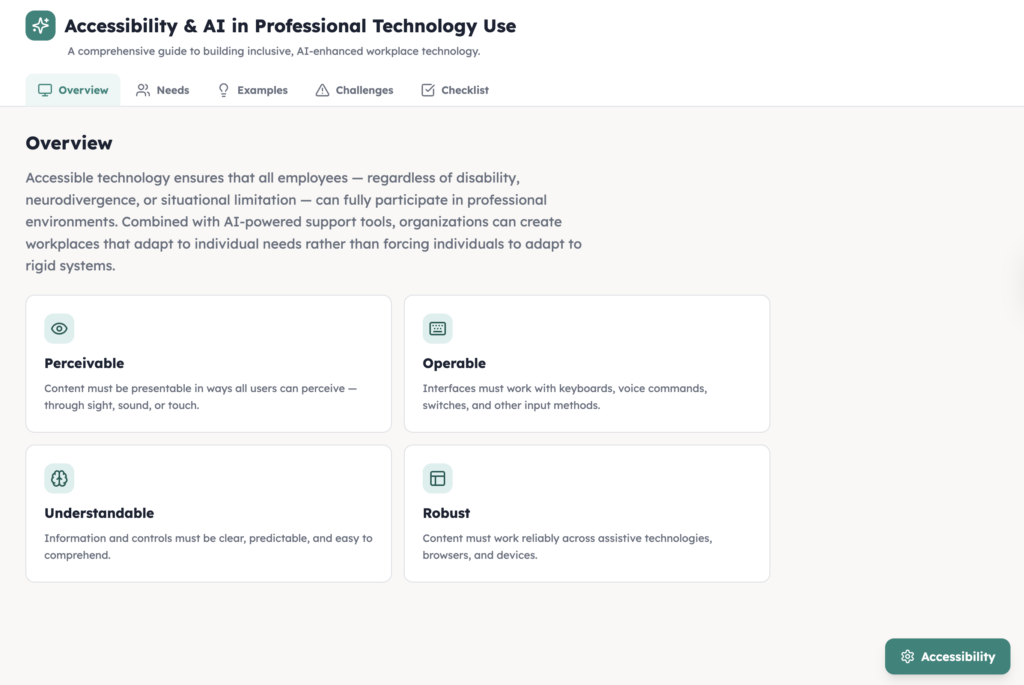
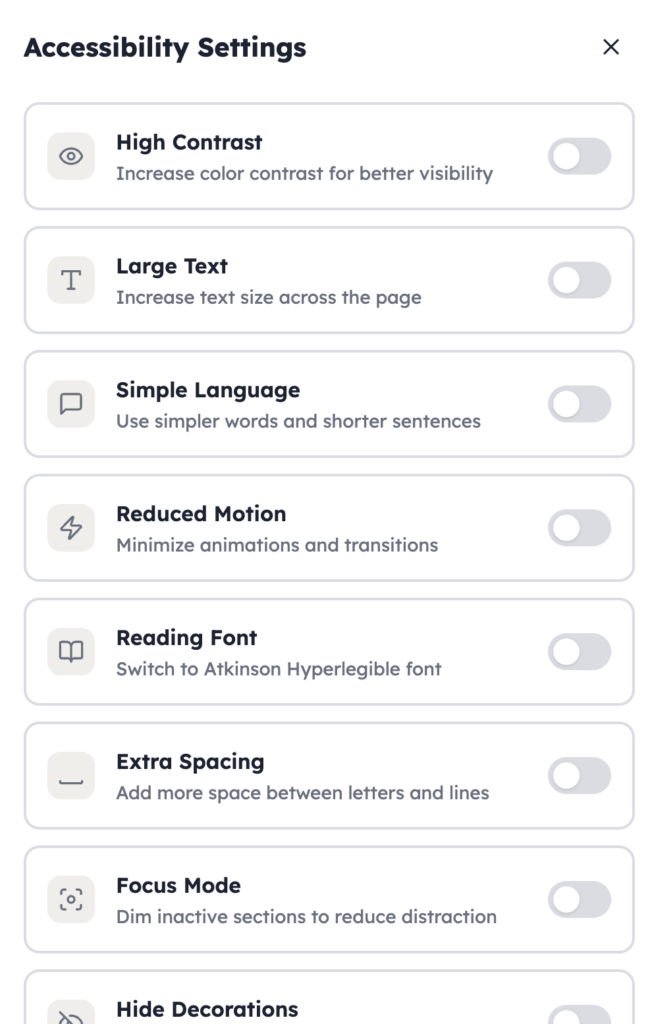
I would like to use an example to introduce this topic by sharing the content I created using AI. I think AI adds another layer to this discussion, thus I have used AI to create a website that includes accessibility features. https://edci136-1.lovable.app
On the website, people may select the accessibility settings, and there are different sections that they can choose from. This will help take care of people with different needs. By adding different features for people to select when needed, this will support all kinds of people with different needs. AI is playing an important role in redesigning the webpage for people with different needs. This takes less than an hour; the creator only needs to know the basic code and the commands to give to AI, and then AI will redesign the webpage and publish it for everyone.
However, AI also has limitations and risks. Therefore, people should avoid overrelying on AI. It is important to know how to use different skills to help people with different needs. AI is just a tool that helps by providing more options and saving time when it comes to designing the learning process for learners.
In conclusion, accessibility and AI in professional technology use have a strong connection, and by using AI, it can help take care of people with different needs. The preparation work will not take too long, and it can maximize the benefits while reducing the costs of caring for all kinds of people.
const disabilityGroups = [ { title: “Visual Disabilities”, icon: Eye, needs: [ “Screen-reader friendly headings and navigation”, “High contrast colors and readable fonts”, “Alt text for images, diagrams, and icons”, “Clear labels for buttons, forms, and links”, ], example: “A worker with low vision may rely on zoom, screen readers, and clear page structure to read workplace documents and online systems.”, simple: “People with visual disabilities may need larger text, stronger contrast, and screen-reader support.”, }, { title: “Hearing Disabilities”, icon: Ear, needs: [ “Captions and transcripts for audio and video”, “Text alternatives for spoken content”, “Visual alerts instead of sound-only alerts”, “Clear written instructions and summaries”, ], example: “A Deaf employee may use captions and written summaries during virtual meetings so they can follow discussion clearly.”, simple: “People with hearing disabilities may need captions, transcripts, and visual alerts.”, }, { title: “Cognitive Disabilities”, icon: Brain, needs: [ “Plain language and shorter sections of text”, “Consistent page layout and navigation”, “Reduced information overload”, “Step-by-step explanations and clear instructions”, ], example: “An employee with attention or processing challenges may benefit from simple wording, predictable layouts, and shorter tasks.”, simple: “People with cognitive disabilities may need simple language, clear structure, and less clutter.”, }, { title: “Physical Disabilities”, icon: Hand, needs: [ “Full keyboard navigation”, “Large buttons and easy click targets”, “Voice input and speech-to-text support”, “Compatibility with assistive devices”, ], example: “A worker with limited hand mobility may use keyboard shortcuts or voice input instead of a mouse.”, simple: “People with physical disabilities may need keyboard access, voice tools, and bigger buttons.”, }, ];
const examples = [ { title: “Accessible Meetings”, detail: “Meeting platforms should include captions, transcripts, readable chat, speaker labels, and keyboard-friendly controls.”, simple: “Online meetings should have captions, readable chat, and easy controls.”, }, { title: “Accessible Documents”, detail: “Professional documents should use headings, plain language, alt text, good contrast, and consistent formatting so more people can read them.”, simple: “Work documents should be clear, organized, and easy to read.”, }, { title: “Accessible Training”, detail: “Training materials should offer multiple formats such as text, captions, visuals, and step-by-step instructions.”, simple: “Training should come in more than one format.”, }, { title: “Accessible AI Tools”, detail: “AI tools should help with summaries, captioning, voice input, and readability, but their output should still be checked by people.”, simple: “AI can help, but people should still review the results.”, }, ];
const challenges = [ “AI captions or transcripts may be inaccurate”, “Some websites look modern but do not work with screen readers”, “Complex pages can overwhelm users with cognitive disabilities”, “Small buttons and mouse-only design can block users with physical disabilities”, “Bias in AI tools can affect fairness in hiring or workplace decisions”, “Organizations may add AI without explaining how it works”, ];
const checklist = [ “Use strong contrast and readable font sizes”, “Support screen readers and keyboard navigation”, “Provide captions, transcripts, and text alternatives”, “Write in plain language and break information into sections”, “Keep buttons large and easy to select”, “Reduce clutter and avoid unnecessary motion”, “Check AI output for accuracy, bias, and accessibility”, “Keep human review for important decisions”, ];
In today’s topic, the speaker has focused on the relationship between digital literacy and democracy. Before I listened to the speaker, I had never thought of the relationship between digital literacy and democracy. I don’t even know if there is a strong relationship between.
In this video, I think this helped me to understand more about the relationship between digital literacy and democracy.
In the speaker’s speech, she mentioned how misinformation and manipulation can directly affect democratic participation, which I had never thought of. This has made me think about how Canada has been working on this issue since misinformation is a common issue in today’s society. Furthermore, AI is a powerful tool that can create some fake information. The thing is Ai can even create a fake video that can mislead people. This makes me really curious how Canada stops or prevents this issue.
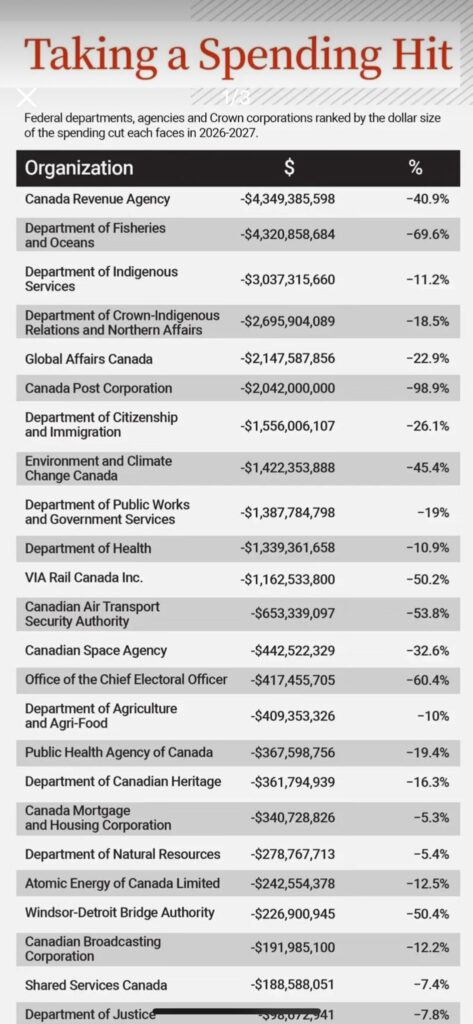
From this findings table, I think this also proves that Canada is focusing more on protecting the country than before. I think it is still not too late, as long as Canada has realized the importance of making sure Canadian citizens are protected and receive the right information from reliable platforms. One more interesting thing I have noticed in Canada is that people cannot see BBC News on social media. I think there must be a reason why, and that also makes me curious.
I like that the speaker provided some examples of how parties use social media or AI to influence people when they have to pick a side. Digital tools can be used to manipulate public opinion in subtle ways. For example, the speaker mentioned that some parties use WeChat and fake images meant to damage political reputations.
As a student or a citizen, we also need to be aware of how to choose what information we can trust. I think choosing reliable sources and making sure we have checked whether the information is real before trusting it is very important.
In this week’s reflection post, I will be focusing on the topic of critical thinking. The speaker mentioned that critical thinking is not just an academic skill; it is also a skill that people can use in their daily lives.
I would like to quote the speaker’s speech: “When people have critical thinking, what makes them believe in something?”
When I apply the speaker’s point to today’s life, I personally think that critical thinking is one of the most important and useful skills for everyone. In today’s society, AI has a huge impact on people’s daily lives. AI has made people’s lives more convenient and more efficient, but at the same time, AI is too powerful, and it can create a lot of fake videos, images, or information for people.
In the video, the speaker mentioned “emotional reactions” and how they have affected people’s beliefs. Therefore, critical thinking has become a useful skill that can help people decide whether information is trustworthy and reliable. It is important to think carefully after you have received some information, and this can help you learn better.
I really like this question that I read from an academic article. I think it has helped me improve my learning a lot.
"Is a learning outcome about critical thinking a matter of emancipatory empowerment or a matter of scientific reasoning? Is critical thinking about finding as a basis for reliable judgements or about forming a sceptical position?"
On the other hand, I really like the gorilla experiment, which showed that people can easily miss obvious things because they are focused on something else. When you apply this to people receiving messages online, it can lead them to believe wrong information due to carelessness.
Therefore, I believe that critical thinking can help us a lot in our daily lives, and we have to stay calm and make sure we have checked whether the information is reliable and trustworthy.
Erikson, M. G., & Erikson, M. (2019). Learning outcomes and critical thinking – good intentions in conflict. Studies in Higher Education (Dorchester-on-Thames), 44(12), 2293–2303. https://doi.org/10.1080/03075079.2018.1486813
In this reflection, I will focus on the speaker’s speech and an article I found. I think he pointed out some ideas that inspired me to think about academic surveillance in higher education. This is a significant issue since AI has made academic surveillance in higher education even more challenging.
Therefore, I would like to point out that his argument “AI proctoring functions like mandated spyware, collecting webcam, microphone, and browser data and flagging “abnormalities,” which can turn learning into a cat-and-mouse relationship.”
I think this will be an interesting topic to discuss, since OpenAI was created in 2015 and AI has improved significantly every year. I personally think AI can be a great tool, but it can also be harmful to learning. Rather than focusing on cat-and-mouse game, I would like to focus on the advantage and disadvantage using AI in education.
The advantages of using AI in learning:
As university students, we often face different concepts and questions that we are not sure about. AI can be a great tool to help us find answers more easily and understand questions faster. Therefore, it can make learning more cost-effective.
Moreover, I also think AI can raise academic standards and educational quality. AI can be a great teacher, and users can ask any questions they have. This can help students learn by using AI.
The disadvantages of using AI in learning:
However, some students use AI in the wrong way. They use AI to do their homework or write papers, which can cause issues such as academic dishonesty.
Moreover, it can raise further concerns about whether the education level is reliable, since students can use AI to complete their papers and homework. Therefore, companies might question whether people who graduated after 2021 actually have the ability that matches their education level, or whether they were just using AI. I think this is a huge issue we need to focus on.
Overall, I believe using AI in the right way can help you learn more effectively through self-learning.
In this recording, a senior university IT leader shares her ideas and explains why cybersecurity is a core part of digital literacy. The speaker also describes her role and how she uses IT in her daily work life. She has also participated in government cybersecurity.
I think she shared many good points, and this is really meaningful. For example, she points out that digital citizenship is an important factor that students should be aware of. Therefore, Wency mentions that students should protect their digital identity and data, and build this as a habit. They should understand that they need resilience against cyber threats so they can protect their online identity. Moreover, Wency also mentions that students need to take responsibility for their online behaviour.
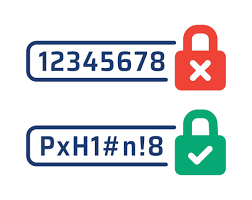
I think one of the important things she points out is how AI impacts people’s lives. Due to AI, cyber threats can involve more believable deception. People may find it hard to realize whether something is real or fake. Therefore, people should be more aware of what they see online. Students should take actions to protect themselves online. For example, they should make sure their software is updated and avoid reusing passwords.
Moreover, I think using a VPN is a good idea to protect your personal information. VPN can stop third parties from seeing which websites you visit or what data you send and receive online. By reading the article below, I found out that a VPN is one of the best tools that can effectively protect your digital citizenship on the internet.
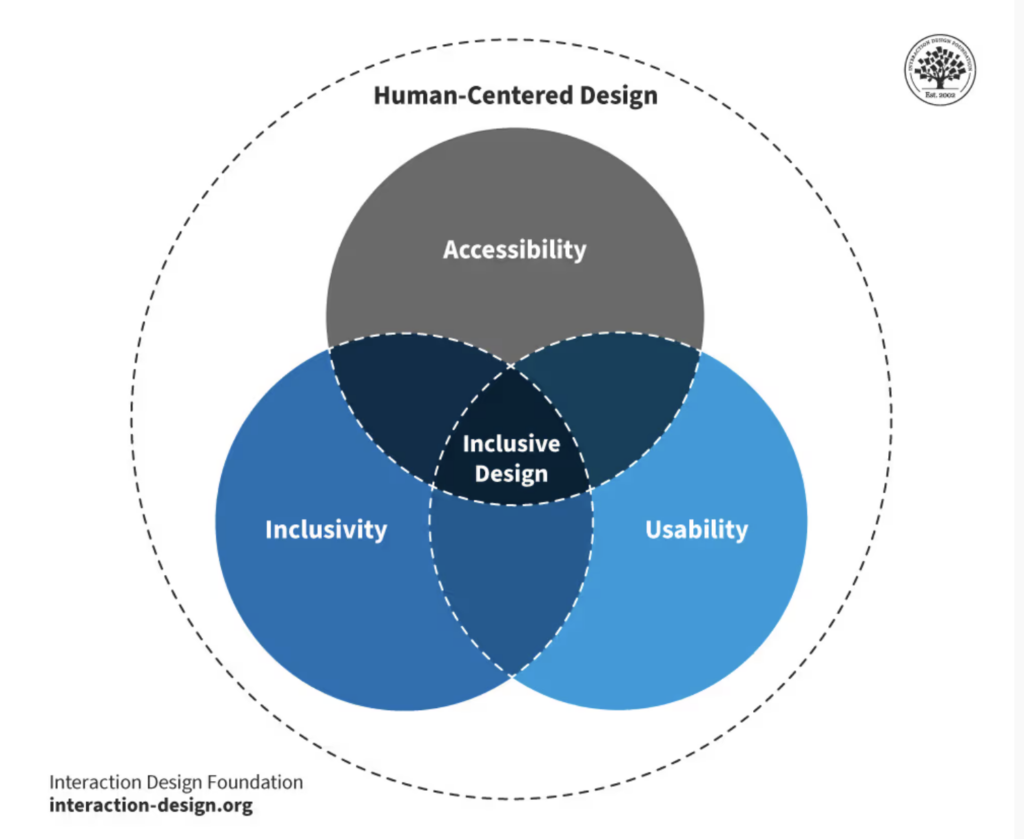
After reading the article and the EDCI 136 class video on accessibility, I realized that active learning and using multimedia can support demonstration at the beginning of the learning process. Based on these factors, we also need to think about how to design learning activities to support student learning. Therefore, accessibility is one of the most important factors that can support student learning, and it plays an important role in the learning process. Sometimes people might overlook learning design, including design context and accessibility. This means that throughout the learning process, there should be no unnecessary barriers for learners; the goal is to provide a friendly, supportive environment for all learners with diverse needs.
I have truly understood how important design context and accessibility are. These should be well designed and should support students in all aspects before learning begins, rather than being treated as a remedial measure. That being said, students should not face any barriers during the learning process. Therefore, the goal of learning design should include accessibility, which can reduce potential barriers that might negatively affect student learning. For example, including subtitles in videos, ensuring the video speed is suitable for learners who need more time to understand, and providing alternative text for images. These factors can affect student learning; therefore, if we consider them early in the design process, students’ learning experience and learning efficiency will greatly improve.
I will use Microsoft as an example, as it is one of the biggest and most successful companies in the world. They truly understand how different people respond during the learning process.
I would like to quote one thoughtful line from the video: “People approach problem-solving differently. Some people learn by trial and error, poking around to make something work. Some people learn by reading or watching videos and taking a step-by-step approach. Some people require absolute silence to focus, while others thrive on noise and energy.”
This shows that different people have different needs. Therefore, planning ahead before the learning process is necessary, and it can help people have a better learning experience.
Therefore, including elements like UDL in the learning process can benefit all kinds of learners. UDL provides multiple representations, so it can support different types of learners. This approach can reduce barriers by offering alternative learning pathways. For example, including text, visuals, audio, or interactive elements can support learners with different needs. However, one thing we need to be aware of is that while UDL provides different learning pathways. But it should not overwhelm learners or distract them from learning. Therefore, including alternative text for images ensures that learners with visual impairments will be able to access the same information. Videos allow learners to engage with content differently. Therefore, it is important to understand that more media is not always beneficial in learning. We need to balance learners’ needs with the learning goals.
In order to ensure learners with visual impairments can access the same information in the learning process, I would include clear text for images. If charts or diagrams are used during the learning process, it is important to include a text-based summary so that learners using screen readers can receive the same information. Moreover, it is important to design a clear layout and use appropriate colour contrast. These elements can help learners have a better learning experience. Lastly, I would ensure all content is screen-reader friendly and provide audio descriptions for essential visual content.
In conclusion, I think a well-designed learning process involves many factors to be aware of. Active learning and multimedia are foundational to the learning process, and the way you design the learning experience depends on how intentionally it is planned. Through the reading, I truly understand that thoughtful design choices can reduce barriers and support meaningful participation for all kinds of learners.
Interaction Design Foundation. (2016, August 16). What is Inclusive Design?. Interaction Design Foundation. https://www.interaction-design.org/literature/topics/inclusive-design