Developing a Personal Approach to AI and Digital Literacy
In this reflection, I will focus on how to develop a personal approach to AI and digital literacy. I think this topic has encouraged me to think more about how digital literacy shapes my choices as a student and how it will become part of my life. I think AI is becoming a common and useful tool that can provide support for people with different needs. Therefore, this has caused me to think about how to use AI correctly and how it can be beneficial to me.
One of the quotes I would like to highlight from this video is, “The youth of today are the leaders of tomorrow, and their skills and potential can change the world.” Therefore, I think digital literacy is more than just knowing how to use technology. It means using technology in the right and efficient way so that it is beneficial to you. Therefore, I think the value of evaluating information, questioning sources, and recognizing bias is the first thing people should understand before using AI in their learning.
GPT-3, GPT-Neo/J, GPT-2 and a T5-based model. The best model was truthful on 58% of questions, while human performance was 94%. Models generated many false answers that mimic popular misconceptions and have the potential to deceive humans. Lin, S., Hilton, J., & Evans, O. (2022).
Therefore, we need to understand the advantages and limitations of AI. That will help people study more effectively. For example, I think AI’s strengths are organizing ideas, improving grammar, and searching for resources. This can help users save a lot of time during those processes. However, this does not mean users can fully trust AI’s work. They still have to fact-check the information and make sure the information they receive is correct. By knowing this, I think AI can be a useful assistant.
Lastly, and most importantly, people should not rely on AI too often and should never let AI replace their thinking. This is because when you learn or do something on your own, it helps you develop skills. If you rely too much on AI, you will lose opportunities to develop important skills. Therefore, it is important to understand that AI can only be an assistant tool that helps you with different tasks, but you are the one leading the process.
By watching this video, I think it is very inspiring and made me think about the future of education. I personally believe there are always pros and cons, and it really depends on how the user uses the tools correctly. At this point, I still think AI is just a large language model, and students should not rely too much on it. At the same time, students also need to know how to use AI because it represents the future.
reference
Lin, S., Hilton, J., & Evans, O. (2022). TruthfulQA: Measuring how models mimic human falsehoods. Proceedings of the 60th Annual Meeting of the Association for Computational Linguistics, 3214–3252.
In EDCI 339, I think this is a very interesting class because it teaches us how to create different tools and websites with various skills and redesign methods to help people with different needs learn. Before I took this class, I had never thought about how people learn effectively or how difficult learning can be for some groups of people with special needs. I had overlooked those people’s needs, the importance of designing a learning model, and the value of a teacher’s instruction.
After completing different tasks in this course, I now have a better understanding of how to design and create accessible tools for all kinds of people, even those with special needs. Another thing I would like to highlight is that I used AI quite often in this course, which helped me learn how to use AI in the right way and how to use AI to create tools more effectively and make them more beneficial for the audience.
At the end of this course, I have learned a lot about multimedia learning and built my own website and comic. Since my major is Economics and my minor is Business, most of my courses involve a lot of papers and exams, which is unlike this class. In this course, I could focus on my interests and apply knowledge in the way I wanted to present it to others. There was a lot of freedom and room for creativity throughout this course. I enjoyed applying that knowledge in a creative way rather than only through papers or exams. Therefore, I am very proud that I created my own website and comic and worked with my groupmate. It was a lot of fun, and throughout the learning process, there were many things that I explored. I also learned many useful skills, such as how to create a website, design a comic, and build a learning model.
I think the biggest takeaway from this class is Mayer’s Principles, and this theory is made up of three core principles. By understanding this theory, it can help me study more effectively and more easily. First, it is important to understand the concept of cognitive load. It is important to break the whole concept up and understand it step by step in small pieces. It would be difficult if you tried to understand everything at once and within a limited amount of time. For example, when I have to prepare for a final exam, I make sure I have notes for my course and write down the key ideas from each chapter in point form. Then I go through my notes step by step on different days. Therefore, it is important not to study at the last minute and to manage my time before the final exam.
Secondly, there is Dual Coding Theory. As an Economics major at the University of Victoria, I have found that drawing graphs with simple text can help me study more effectively, and this theory relates to the idea that some people may find learning from images easier than learning only from text-based notes. Therefore, I usually make my notes include both text and graphs to help myself learn more effectively and more easily.
The last concept is active processing. I think this step is the most important part of learning because actively thinking by connecting different knowledge that you have learned may give you a better picture of what something is about, and it can help me remember it for longer. Eventually, I can apply my knowledge to a different field, such as the stock market.
The biggest challenge in this class was the last project, since one group member never showed up. This increased the workload for me and my other group member a lot. Luckily, we divided the work and checked in regularly to make sure everything stayed on track. I think this was a great experience for me because when unexpected things happen in life, it is important to plan ahead and seek help when it is needed.
In the future, I think I will apply the knowledge and group project experience that I learned from this class in my workplace. Since I am working at BC Children’s Hospital, I think all of this experience and knowledge will help me deal with unexpected situations and apply Mayer’s Principles when I am learning the workflow and new things in my workplace. I will share those skills with my colleague, and I think this can help us work more effectively in the future.
Accessibility and AI in Professional Technology Use
IIn this week’s topic, when it comes to accessibility and AI in professional technology use, it inspired me to think about how AI helps and supports people with different needs. Since AI can increase people’s work performance, I think it can be a great tool to help people with visual, hearing, cognitive, or physical disabilities have better accessibility in learning.
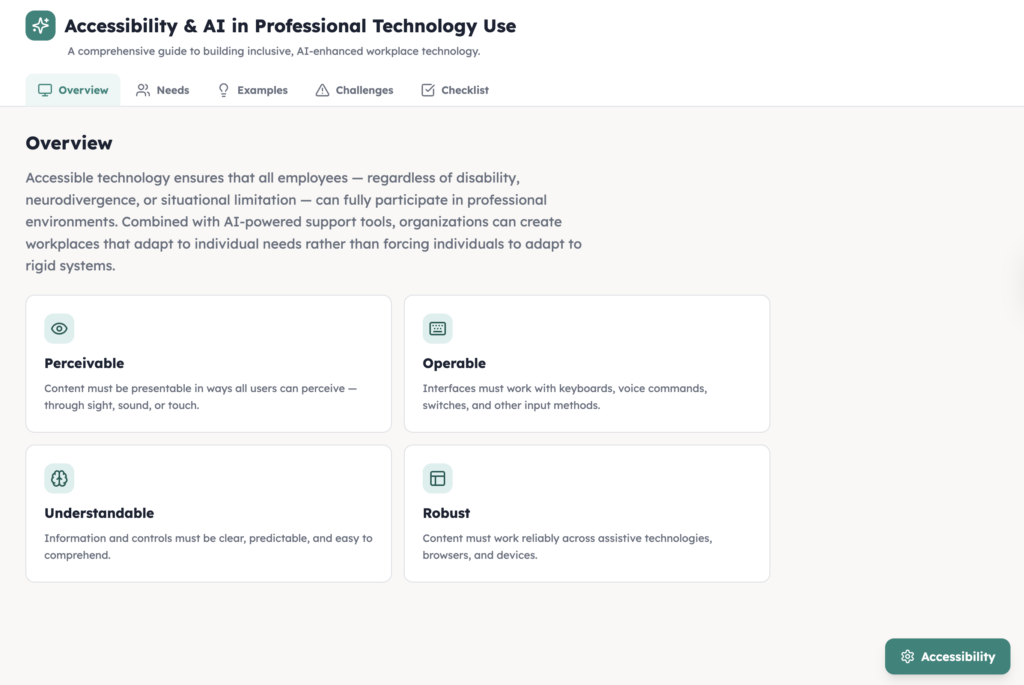
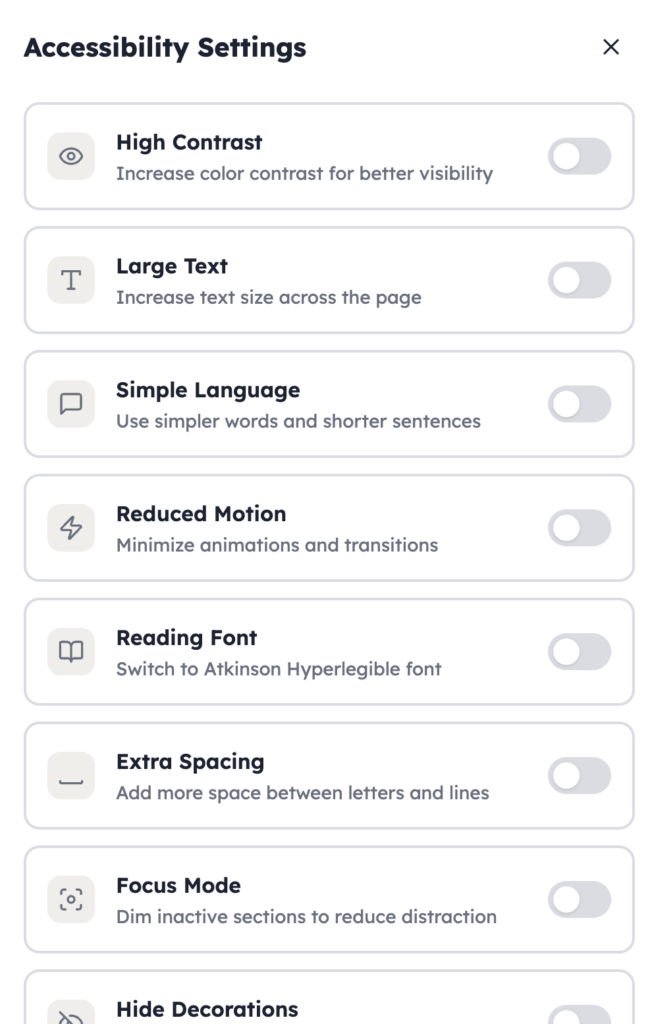
I would like to use an example to introduce this topic by sharing the content I created using AI. I think AI adds another layer to this discussion, thus I have used AI to create a website that includes accessibility features. https://edci136-1.lovable.app
On the website, people may select the accessibility settings, and there are different sections that they can choose from. This will help take care of people with different needs. By adding different features for people to select when needed, this will support all kinds of people with different needs. AI is playing an important role in redesigning the webpage for people with different needs. This takes less than an hour; the creator only needs to know the basic code and the commands to give to AI, and then AI will redesign the webpage and publish it for everyone.
However, AI also has limitations and risks. Therefore, people should avoid overrelying on AI. It is important to know how to use different skills to help people with different needs. AI is just a tool that helps by providing more options and saving time when it comes to designing the learning process for learners.
In conclusion, accessibility and AI in professional technology use have a strong connection, and by using AI, it can help take care of people with different needs. The preparation work will not take too long, and it can maximize the benefits while reducing the costs of caring for all kinds of people.
const disabilityGroups = [ { title: “Visual Disabilities”, icon: Eye, needs: [ “Screen-reader friendly headings and navigation”, “High contrast colors and readable fonts”, “Alt text for images, diagrams, and icons”, “Clear labels for buttons, forms, and links”, ], example: “A worker with low vision may rely on zoom, screen readers, and clear page structure to read workplace documents and online systems.”, simple: “People with visual disabilities may need larger text, stronger contrast, and screen-reader support.”, }, { title: “Hearing Disabilities”, icon: Ear, needs: [ “Captions and transcripts for audio and video”, “Text alternatives for spoken content”, “Visual alerts instead of sound-only alerts”, “Clear written instructions and summaries”, ], example: “A Deaf employee may use captions and written summaries during virtual meetings so they can follow discussion clearly.”, simple: “People with hearing disabilities may need captions, transcripts, and visual alerts.”, }, { title: “Cognitive Disabilities”, icon: Brain, needs: [ “Plain language and shorter sections of text”, “Consistent page layout and navigation”, “Reduced information overload”, “Step-by-step explanations and clear instructions”, ], example: “An employee with attention or processing challenges may benefit from simple wording, predictable layouts, and shorter tasks.”, simple: “People with cognitive disabilities may need simple language, clear structure, and less clutter.”, }, { title: “Physical Disabilities”, icon: Hand, needs: [ “Full keyboard navigation”, “Large buttons and easy click targets”, “Voice input and speech-to-text support”, “Compatibility with assistive devices”, ], example: “A worker with limited hand mobility may use keyboard shortcuts or voice input instead of a mouse.”, simple: “People with physical disabilities may need keyboard access, voice tools, and bigger buttons.”, }, ];
const examples = [ { title: “Accessible Meetings”, detail: “Meeting platforms should include captions, transcripts, readable chat, speaker labels, and keyboard-friendly controls.”, simple: “Online meetings should have captions, readable chat, and easy controls.”, }, { title: “Accessible Documents”, detail: “Professional documents should use headings, plain language, alt text, good contrast, and consistent formatting so more people can read them.”, simple: “Work documents should be clear, organized, and easy to read.”, }, { title: “Accessible Training”, detail: “Training materials should offer multiple formats such as text, captions, visuals, and step-by-step instructions.”, simple: “Training should come in more than one format.”, }, { title: “Accessible AI Tools”, detail: “AI tools should help with summaries, captioning, voice input, and readability, but their output should still be checked by people.”, simple: “AI can help, but people should still review the results.”, }, ];
const challenges = [ “AI captions or transcripts may be inaccurate”, “Some websites look modern but do not work with screen readers”, “Complex pages can overwhelm users with cognitive disabilities”, “Small buttons and mouse-only design can block users with physical disabilities”, “Bias in AI tools can affect fairness in hiring or workplace decisions”, “Organizations may add AI without explaining how it works”, ];
const checklist = [ “Use strong contrast and readable font sizes”, “Support screen readers and keyboard navigation”, “Provide captions, transcripts, and text alternatives”, “Write in plain language and break information into sections”, “Keep buttons large and easy to select”, “Reduce clutter and avoid unnecessary motion”, “Check AI output for accuracy, bias, and accessibility”, “Keep human review for important decisions”, ];
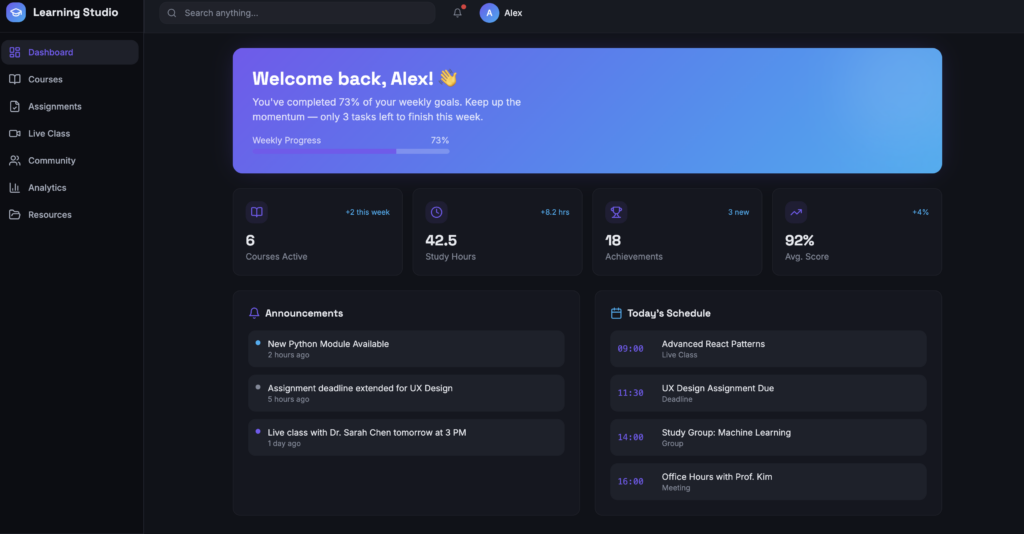
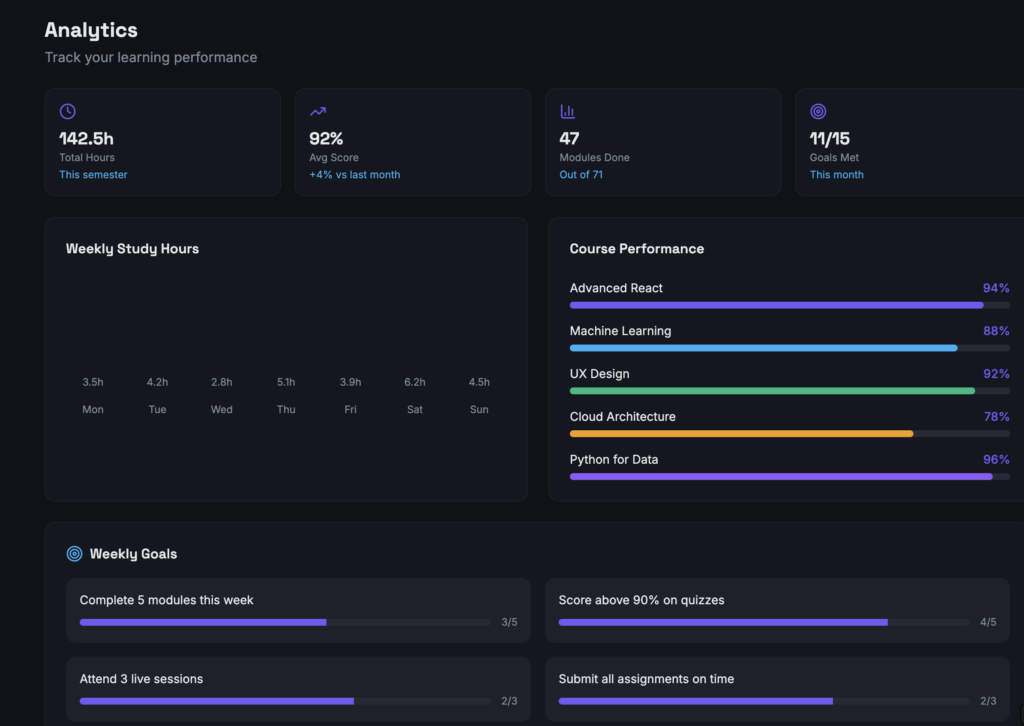
In order to improve self-learning, students may now track their own learning process through this website. On this website, there will be different sections that show students’ performance, active time, and goals. The website will show the results to students, and students may find it easier to track their learning process. Moreover, by including AI to analyze student performance, students may receive feedback from the AI, and teachers may see their results on their end. Teachers can redesign their teaching by understanding students’ areas of weakness. This will maximize the learning experience and help students improve their academic performance.
By using this website, teachers will understand their classes better. Teachers will no longer rely only on textbooks to teach students. They may address students’ weaknesses and identify what they need more help with. The teaching method will no longer be one-way; instead, it will involve feedback and redesign depending on students’ needs.
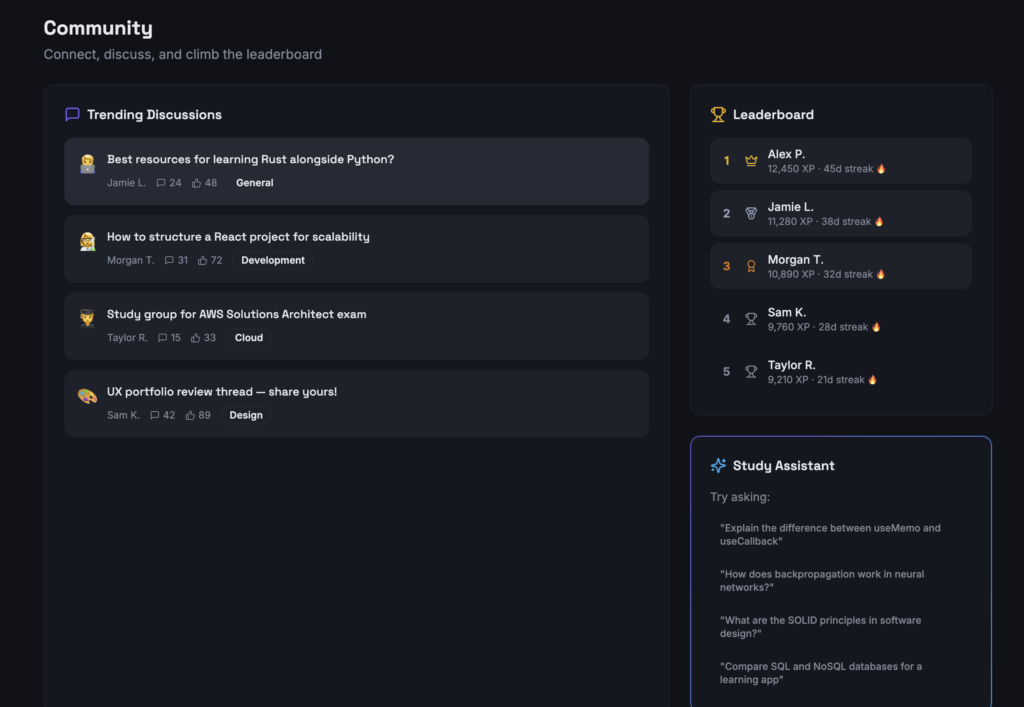
On the other hand, I have added a community feature to this website, which will encourage students to be more active and participate in class more often. By setting up some competitions, such as a leaderboard, it will encourage students to be more active in learning outside of class. Moreover, students may exchange their ideas and thoughts in the community. They will be able to learn outside of the classroom.
After talking with Instructor Adrian Granchelli, I had a great conversation with him. He has a Master of Educational Technology and is currently pursuing a PhD in Educational Studies with a focus on educational technology at the University of Victoria. As a PhD student and a contract instructor at UVic, he shared his opinions on different questions. Here are his opinions on each question.
Adrian Granchelli’s thoughts:
Do you think AI should be used more as a tutor, a teaching assistant, or a teaching tool in classrooms? Why?
Teachers may provide review and personal feedback, but AI cannot.
How is AI changing the role of teachers compared with traditional classrooms?
This is a big change for both teachers and students. For example, the way AI is breaking into today’s society is similar to how the internet was introduced to the world in the 2000s. Therefore, Adrian believes that AI can accelerate the learning and studying process.
How can AI improve student independence, or could it make students rely too much on technology?
Yes, there is a risk and a negative effect on student learning, since AI is considered a large language model. Therefore, it can limit people’s ability to remember things, and students may become overly reliant on technology rather than using their own brains. For example, because of the Google effect, students may simply search for the answer directly without going through any learning process in between. This can be harmful to student learning.
How will AI change the relationship between teachers and students in a positive or negative way?
Instructor Adrian hopes that teachers will be able to use their social skills and have a better connection with students in the future. Moreover, he also mentioned that teachers have been devalued in today’s society. Since AI will never be able to replace teachers, he thinks that the value of teachers has been overlooked by the education system.
In your opinion, what skills will students need most in an AI-classroom environment?
He mentioned that it is important to have evaluative judgment and critical thinking skills. These two skills will be useful and help students learn and receive the right information. Therefore, teachers should spend more time teaching students how to apply these skills in their self-learning with AI.
How should schools balance the benefits of AI with concerns about bias?
He mentioned that AI usually provides one answer, and students often think that it is the only answer. This is a huge misunderstanding and can mislead students in learning. Therefore, teachers should teach students critical thinking skills so they can apply their knowledge when it comes to self-learning with AI. AI cannot provide the full picture of what you are looking for. Therefore, he mentioned that students need to learn how to learn outside of AI, fact-check the information they receive, and seek help or confirmation from teachers when they find something online or through AI. Teachers will be the ones who guide them on the right educational path.
In conclusion, there are pros and cons when you use different tools, and it depends on how you use them in your learning. it is important to know how to use the tools in the right way, and that will help you learn more effectively. One thing is that we are now watching a huge milestone of education changing in the next few years.
In today’s topic, I will be focusing on how AI is changing the roles of teachers and students. I think this is really interesting to explore. By 2025, AI has become smarter and more accurate in providing answers to users. Many educational platforms have also included AI in their systems. Even Google, Adobe, Facebook, and many other things around us have been incorporating AI. Therefore, education is also reaching a milestone in 2025.
People know that education means helping students learn knowledge before entering society. Therefore, that knowledge has to be related to today’s world and up-to-date information. Preventing students from using AI will limit their learning potential; therefore, teaching students how to use AI is the right approach, and AI can be a great assistant tool while studying.
First, what are AI classrooms?
AI classrooms mean that studentS are allowED to use AI in the classroom. Ai will help student learning in the classroom as an assistant.
How AI is Changing the Role of Teachers and Students
There are some common misunderstandings people have about using AI in the education system. First, it is important to make it clear that using AI does not mean that teachers will be replaced by AI. AI can be a great tool for engaging students through “structured feedback,” “interactive scaffolding,” and “personalization alignment.” Students can benefit from these supports in their learning process.
On the other hand, teachers can also benefit from AI by using it for “lesson planning,” “personalized feedback,” and “administrative tasks.” Therefore, teachers will be able to spend more time discussing with students, focusing on student relationships, and guiding students toward deeper learning experiences rather than spending all their time on routine work.
Furthermore, teachers have the responsibility to teach students how to think critically and not trust AI too easily. Teachers should highlight that it is important to check whether the information students receive from the internet or AI is true or not. Without critical thinking, students may accept biased or misleading information without questioning it.
For example, when users are using Claude, it is important for students to know how to properly use certain code inputs in the AI system. Once those codes are entered into the system, they can help the AI understand and answer questions more accurately. Therefore, teachers can be the ones who teach students how to use AI, rather than letting them use it only to look for answers without any learning.
Therefore, the education system should change its structure and be open-minded about students and teachers using AI in the classroom. It is important to make sure the roles are clear and to consider what teachers should focus on more when the education system includes AI learning. Teachers will still be able to provide support that AI classrooms cannot provide, such as personalized feedback and discussions with different students.
In conclusion, I think it is important for the education system to teach students and teachers how to use AI in the right way. Furthermore, teachers should know how to guide students in using AI properly so they can learn more effectively. Eventually, using AI properly can provide a more effective method of learning.
Reference
Long DY, Wang S, Md Rashid S and Lu XT (2026) Artificial intelligence in higher education: a systematic review of its impact on student engagement and the mediating role of teaching methods. Front. Educ. 10:1648661. doi: 10.3389/feduc.2025.1648661
In today’s topic, the speaker has focused on the relationship between digital literacy and democracy. Before I listened to the speaker, I had never thought of the relationship between digital literacy and democracy. I don’t even know if there is a strong relationship between.
In this video, I think this helped me to understand more about the relationship between digital literacy and democracy.
In the speaker’s speech, she mentioned how misinformation and manipulation can directly affect democratic participation, which I had never thought of. This has made me think about how Canada has been working on this issue since misinformation is a common issue in today’s society. Furthermore, AI is a powerful tool that can create some fake information. The thing is Ai can even create a fake video that can mislead people. This makes me really curious how Canada stops or prevents this issue.
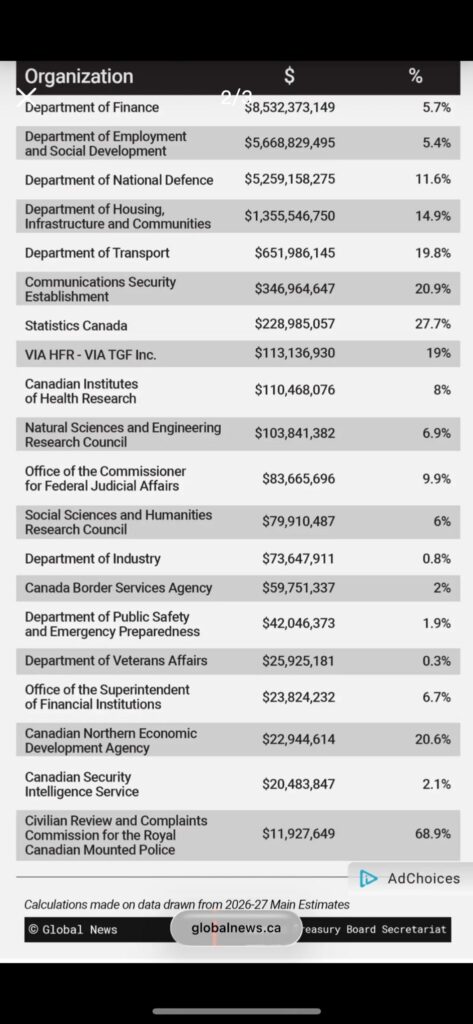
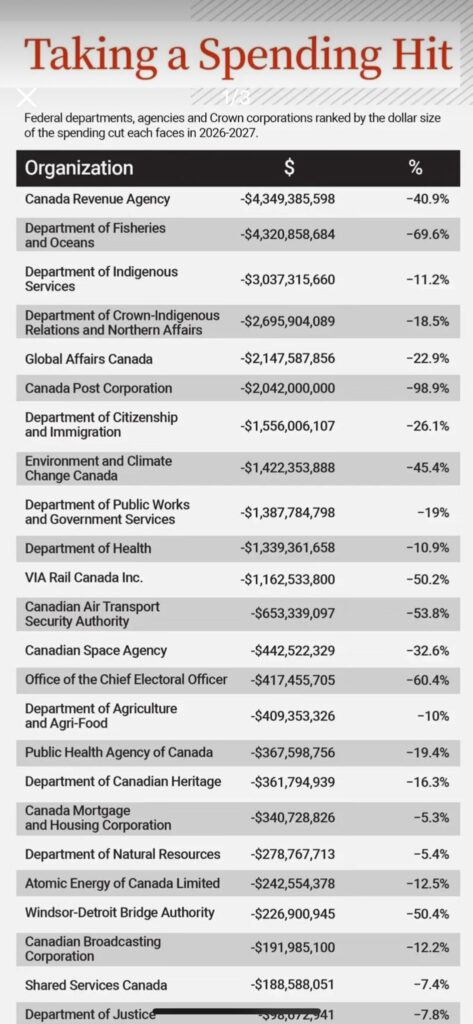
From this findings table, I think this also proves that Canada is focusing more on protecting the country than before. I think it is still not too late, as long as Canada has realized the importance of making sure Canadian citizens are protected and receive the right information from reliable platforms. One more interesting thing I have noticed in Canada is that people cannot see BBC News on social media. I think there must be a reason why, and that also makes me curious.
I like that the speaker provided some examples of how parties use social media or AI to influence people when they have to pick a side. Digital tools can be used to manipulate public opinion in subtle ways. For example, the speaker mentioned that some parties use WeChat and fake images meant to damage political reputations.
As a student or a citizen, we also need to be aware of how to choose what information we can trust. I think choosing reliable sources and making sure we have checked whether the information is real before trusting it is very important.
In this week’s reflection post, I will be focusing on the topic of critical thinking. The speaker mentioned that critical thinking is not just an academic skill; it is also a skill that people can use in their daily lives.
I would like to quote the speaker’s speech: “When people have critical thinking, what makes them believe in something?”
When I apply the speaker’s point to today’s life, I personally think that critical thinking is one of the most important and useful skills for everyone. In today’s society, AI has a huge impact on people’s daily lives. AI has made people’s lives more convenient and more efficient, but at the same time, AI is too powerful, and it can create a lot of fake videos, images, or information for people.
In the video, the speaker mentioned “emotional reactions” and how they have affected people’s beliefs. Therefore, critical thinking has become a useful skill that can help people decide whether information is trustworthy and reliable. It is important to think carefully after you have received some information, and this can help you learn better.
I really like this question that I read from an academic article. I think it has helped me improve my learning a lot.
"Is a learning outcome about critical thinking a matter of emancipatory empowerment or a matter of scientific reasoning? Is critical thinking about finding as a basis for reliable judgements or about forming a sceptical position?"
On the other hand, I really like the gorilla experiment, which showed that people can easily miss obvious things because they are focused on something else. When you apply this to people receiving messages online, it can lead them to believe wrong information due to carelessness.
Therefore, I believe that critical thinking can help us a lot in our daily lives, and we have to stay calm and make sure we have checked whether the information is reliable and trustworthy.
Erikson, M. G., & Erikson, M. (2019). Learning outcomes and critical thinking – good intentions in conflict. Studies in Higher Education (Dorchester-on-Thames), 44(12), 2293–2303. https://doi.org/10.1080/03075079.2018.1486813
Topic: Managing money as a student: tracking expenses, saving tips, common traps
Updated: March 16, 2026
Authors: Himson Chu, Parsa Peikani
INTRODUCTION:
In today’s society, people admire materialism, and students can easily fall into common consumer traps and develop incorrect consumption habits because they have never received formal instruction on budgeting, tracking spending, and avoiding financial mistakes. Even though money management is an important skill, students can hardly learn it in school, and these skills have often been overlooked. In order to help students avoid overspending, relying too heavily on credit, and struggling to save, this learning model is designed to help students spend and use their money wisely and recognize common spending traps before they become bigger problems.
The goal of this resource is to establish a correct concept of consumption. We have designed a learning model that can help students use and save their money wisely, which is relevant to student life. Therefore, in this learning model, we aim to make the learning process an easy-to-understand and engaging resource for students by incorporating multimedia, interactive elements, multimedia learning theories, active learning models, accessible online content, and universal design for learning strategies, so that learners can eventually apply the content to their own lives.
DESCRIBE THE CHALLENGE:
University is often the first time students have real control over their own money—and it can feel overwhelming fast. Tuition, rent, groceries, transportation, and other entertainment activities can eat up a student’s entire income. Meanwhile, peer pressure, fear of missing out, and “treat yourself” culture make it easy to overspend without noticing.
Our website design responds to the challenges that students may face. By giving them a step-by-step guide to understand and use the tools on the website daily to manage their money more easily.
CONTEXT AND AUDIENCE:
The primary audience will be freshmen and sophomore undergraduate students living away from home for the first time on a tight budget. They’re navigating dormitory life or first off-campus rentals, dealing with newfound freedom, and feeling the pressure to keep up socially. This topic connects strongly to students’ lived experiences, such as rental, food expenses, online shopping and credit carding
Due to this resource, the target audience will be above 18; therefore, we will include more specific terms and skills that can actually help them in real life. Furthermore, in order to help university students apply the knowledge from the learning model, we have created different trackers that can help students apply their knowledge to different concepts. These tools will be useful, and they may use them at any time.
In order to support learners with different needs, the resource uses:
plain language
short sections
visual examples
step-by-step tasks
practical scenarios
POV STATEMENT:
Students should develop good financial habits, which is a practical and easy-to-understand financial management method. This can help them manage their spending, use their money wisely, and avoid common financial mistakes.
LEARNING OBJECTIVES:
By the end of this resource, students will be able to:
Identify and categorize their income and essential vs. discretionary expenses.
Monitor and record daily expenses using simple digital tools.
Identify 5 common budgeting traps specific to students.
Apply practical saving techniques such as 50/30/20 rules.
Design and create a personalized monthly budget template.
In this learning model, students may take away the knowledge they have learned from this learning process. After completing the model, they can still use the tools to help them manage and use their money wisely.
Plan (Ideate, Sketch, Elaborate)
IDEATION:
IIn the planning process, our model focuses on the real financial challenges that students may face in their daily lives. We have developed a well-organized website for students with different needs to access. We have six different modules on the website, including quizzes, tools, text, videos, and images, which can help students learn even if they have different needs. After completing the tasks, they will also receive feedback from the website, which will provide suggestions on how to use their money wisely.
The model includes:
Explore common financial challenges students face
Spending examples of collecting realistic student data
Including some of the relatable examples, such as coffee spending, food delivery, subscriptions, transport, and shopping
Design interactive activities
Create a simple budget tracker tool
Student will some feedback once they have upload their expenses tracker
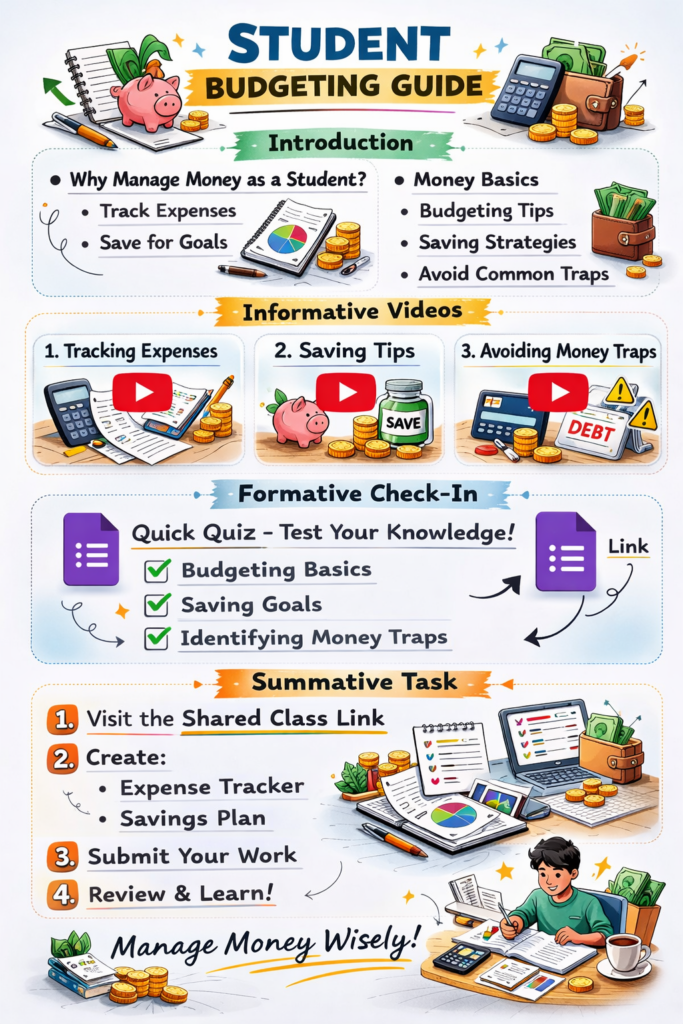
Those ideas and thoughts have helped us create a website with a written introduction and informative videos on how to manage money. The goal of the tracker is a formative check-in to ensure students understand. The summative task is to help students track and manage their money wisely. Students may upload their tracker to see their expenses and receive feedback from the website or analyze them.
STORYBOARD OR SCRIPT
The website is an easy-to-access tool for students to learn and apply the knowledge they have gained.
On this website, we have included different features for learners. We aim to help students understand and apply the knowledge in their daily lives. On the website we have included five different modules:
1.Income vs. Expenses
Students learn where money comes from and where it goes.
2. Track Your Spending
Students can use the interactive budget tracker to input their different spending and build awareness of where their money actually goes.
3. 5 Budgeting Traps
Students will be introduced to the five common traps that can stop them from saving money, such as procrastination, subscription creep, emotional spending, credit card overuse, and social pressure.
4. The 50/30/20 Rule
This model introduces a simple budgeting framework that divides income into needs, wants, and savings. This teaches students a simple rule for spending their money.
5. Build Your Budget
In the last section, students will use all the knowledge they have learned from this model and enter everything into the model. This will be a very useful tool for students to actually use and apply the knowledge in their real lives.
6.References and Resources
The module is built step by step and helps students work through different concepts and tasks. We have included some everyday solutions to help students better understand the content.
Since managing their own expenses and applying the 50/30/20 Rule involves a lot of math, we have designed a tracker. Students only need to enter the numbers, and the tracker will help them do the math and provide basic advice.
PEER FEEDBACK:
The thing that came up the most in terms of strengths was that the topic is very strong, relevant, and easy for students to connect with. The topic focuses on a common issue that students may face when they are living by themselves in college. They have to live independently and manage their money on their own. This can be very challenging for students since they may have never lived by themselves before going to college. Therefore, the feedback mentioned that my learning objective is clear, engaging, and realistic. They also highlighted that the tools we created are very useful for students when it comes to managing their money. Since we not only provide students with concepts and knowledge but also give them a chance to apply that knowledge, this will help students in the learning process.
They also mentioned that we have applied theories well on the website and that it has a good mix of visuals, text, activities, and real-life examples, such as rental expenses and other daily expenses. They found the tools very useful for students who have difficulty managing their money. In the project, the website connected well with learning theories such as Accessible Multimedia, UDL, and Merrill’s real-world learning. Students may apply their knowledge in their real lives after learning from the model.
The biggest area for improvement that both peers pointed out is that the website needs more visuals because it is too text-heavy and looks too “informative.” Therefore, we have included more images, tables, and quizzes to help and test students after each section. Therefore, we made some changes and restructured the pattern in the final design for the website. The latest version of the website will provide clear, simple text, images and a well-organized website that will provide a better learning experience for students.
REFLECT AND REFINE:
The things that worked best on the website were its strong use of constructivism and learning by doing. On the website, different modules have different tasks and quizzes that require students to complete them. Through these tasks and quizzes, students may strengthen the knowledge they have learned. Furthermore, both pieces of feedback confirmed that we have a strong structure that guides students step by step through the learning process. Therefore, based on this feedback, we kept the same structure in the new version of the website.
On the other hand, based on the feedback, we made several revisions. One thing that needed improvement was that we used too much information and text on the website. Since extra material adds extraneous cognitive load and should be removed (Mayer, 2009), we removed some of the text and replaced it with images and quizzes. This helps students learn and check their understanding during the learning process. The model guides students step by step, and the website has been restructured to include videos, quizzes, and different texts to help students learn. Furthermore, this allows readers to learn through both visual and verbal channels (Paivio, 1986). The model structure also follows the segmenting principle by presenting the message across different modules (Mayer, 2009).
Lastly, in order to increase interactive elements, we added quizzes and additional reflection activities that would engage learners more. After they submit the tasks, feedback will be shown, including which areas the students need to improve in each module. In conclusion, this was a great experience that helped us understand how important open educational resources are and how to design a website for students with different needs. The feedback provided us with valuable advice that helped us improve the website and provide students with a better learning experience.
Universal Design for Learning (UDL): Employing a variety of presentation methods (visual and textual) to stimulate participation (related things that students may see in their daily lives) and support expressive methods (which can motivate students to learn more in depth).
Constructivism / learning by doing: From the website, students may apply the knowledge they have learned, such as using budget trackers, entering their income, and adding their expenses. It can help students create their own personalized monthly budgets. These activities can help students build understanding through practice.
Accessible Multimedia:
The website uses simple text, images, videos, and clear page organization. This will make the content easier to follow and create a better learning experience for students.
Web Content Accessibility Features:
Use videos to help students learn.
Use simple and easy-to-understand language, and avoid unnecessary jargon.
Ensure sufficient contrast between the text and the background.
Use organized tables to help students read the content.
Use table sections to help students learn the concepts.
Use images to help students learn and receive the same information when they have different needs.
Cognitive Load Theory:
In one of the model’s 50/30/20 rule pages, learners are shown some examples and then required to test their knowledge. This is a “demonstrate first, then practice” approach.
Scaffolding :
In the model, we have created a step-by-step guide to lead learners through the process. In the beginning, we have the introduction, then the quiz, and then different tasks that we would like students to complete. At the end, students need to use everything they have learned and apply it in the last section. It will be a useful tool that students may take away to help them manage their money in the future.
Self-Regulated Learning :
In the model, students will learn different concepts in different modules. After that, they will apply the knowledge by using different tools, such as a tracker, reflection prompts, and a budget builder, which will encourage students to monitor their own behaviour.
TEAMWORK REFLECTION:
In terms of teamwork, I think we divided the work well. We set up regular meetings and had regular check-ins when there were issues or confusion.
I focused on most of the writing for this webpage and helped create one of the budgeting tools on the website. I think I learned a lot by organizing this webpage. I understand that working with others is not the same as working alone. Therefore, I set up regular check-ins and checked the channel often to make sure Parsa Peikani did not have any confusion or questions. I think it was important that we worked collaboratively throughout the process and maintained consistent communication to ensure the project stayed clear and aligned with our goals.
On the other hand, Parsa Peikani is a computer science major, so he created a wonderful and well-organized website that includes different theories such as UDL, Constructivism, Accessible Multimedia, Cognitive Load Theory, Scaffolding, and Self-Regulated Learning. Those factors are important when it comes to designing a website. I think this was very challenging for him since he was the only one working on the website. Therefore, I think this was very challenging for him. Luckily, after all the hard work we did, we overcame all the problems and confusion related to the website or webpage. I think this was a successful group project.
Academic References
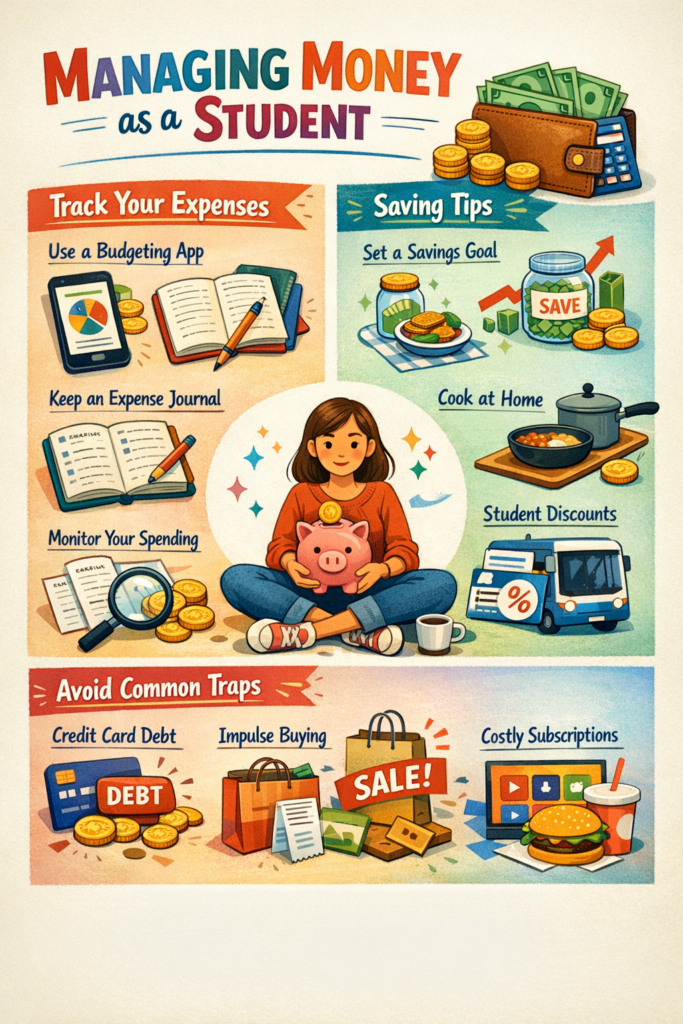
AI-Generated Picture
Canadian University Survey Consortium. (2023). 2023 graduating student survey: Master report. CUSC-CCREU. https://cusc-ccreu.ca/
Lusardi, A., & Mitchell, O. S. (2014). The economic importance of financial literacy: Theory and evidence. Journal of Economic Literature, 52(1), 5-44. https://doi.org/10.1257/jel.52.1.5
Prelec, D., & Simester, D. (2001). Always leave home without it: A further investigation of the credit-card effect on willingness to pay. Marketing Letters, 12(1), 5-12. https://doi.org/10.1023/A:1008196717017
Warren, E., & Tyagi, A. W. (2005). All your worth: The ultimate lifetime money plan. Free Press.
Granchelli, A. (2025, November 2). Accessible Multimedia. University of Victoria: Educational Technology. https://edtechuvic.ca/edci337/2025/11/02/accessible-multimedia/
Granchelli, A. (2025, September 5). Theories of Multimedia Learning. University of Victoria: Educational Technology. https://edtechuvic.ca/edci337/2025/09/05/theories-of-multimedia-learning/
Granchelli, A. (2025, October 19). Models of Active Learning. University of Victoria: Educational Technology. https://edtechuvic.ca/edci337/2025/10/19/models-of-active-learning/
In today’s topic, I will focus on what changed in education in 2020. I personally think that this year was the first step in changing education. I would say 2020 became a milestone for education, exposing the outdated nature of traditional learning approaches. Since then, people have sought new methods of teaching and learning to help students succeed under different circumstances.
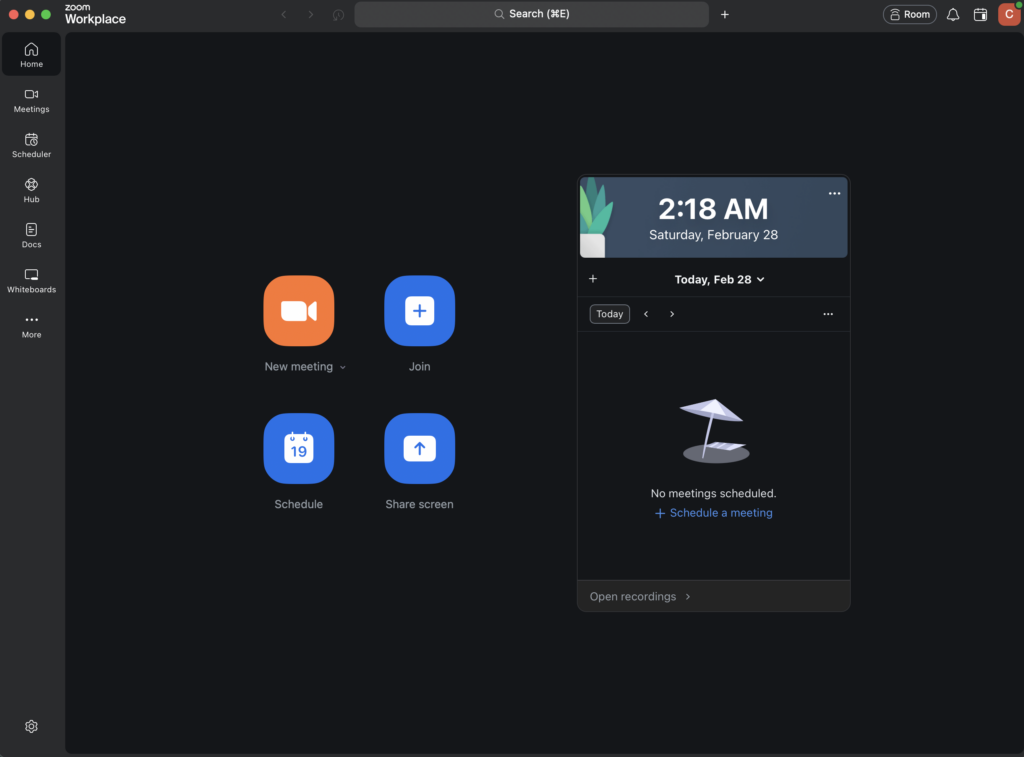
The COVID-19 outbreak in late 2019 led to social distancing, and the government rolled out restrictions. People could not go to school due to COVID-19. Everyone panicked, not only because of the virus itself, but also because students could not study the way they used to. In 2020, online learning and online lessons became common around the world. Students used Zoom to learn and participate in class. Therefore, in today’s topic, I would like to talk about Zoom and the benefits of learning online.
Zoom is one of the common apps that students will use in 2020. We use this app to participate in class.
I think it will be a good idea to use Zoom to record, since Zoom has become one of the most common tools students use to participate in class. Students are able to study more flexibly. It has expanded the possibilities for learning. Learning is no longer limited. Students can study or join class even from a different country. Furthermore, they are able to study or attend lessons in a comfortable environment.
Moreover, Zoom gives students more flexibility with time; they can schedule meetings with their classmates at times that work for them.
Last but not least, Zoom allows teachers to save recordings. Even if students miss a lesson for personal reasons, they can still watch the recording after class.
The benefits of online learning
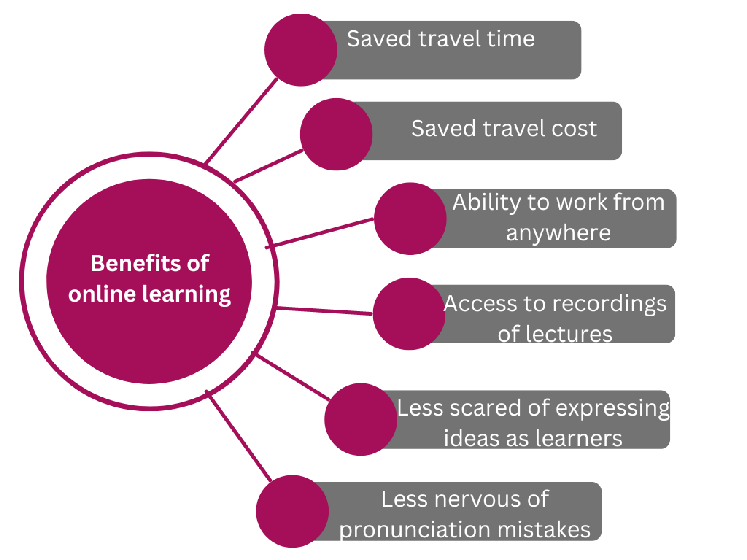
I think tools such as Zoom have broken the limits of learning. Students are no longer limited in how they learn. Therefore, online learning has provided many benefits to students, such as saving travel time, reducing travel costs, allowing students to study where they feel comfortable, and learning at times that work for them.
I would love to share this quote. Online learning, according to Latchem (2014), “ceases to be mere delivery of digital learning products for the students’ consumption and becomes a platform whereupon knowledge and learning are created by students through interaction, collaboration and inquiry” (p. 311).
Social media has become one of the most useful tools for learning. Therefore, I believe social media platforms like WordPress can serve as supplementary tools to help students maintain their learning progress. Students can post their feedback and learning progress throughout the semester.
This approach breaks away from traditional teaching models, integrates more diverse educational strategies, and can enhance students’ enthusiasm for learning.
Students have the freedom to manage their own learning time and actively manage their learning process. Teachers provide support to all members through group meetings. Students can discover more interesting knowledge through peer interaction, and when encountering difficulties, they can exchange ideas and learn from each other. Therefore, I believe 2020 was a significant milestone in the development of the education system.
I think this will be an interesting topic to explore. Education across 19 countries was quite similar until 2019. After 2019, education methods, styles, and systems changed significantly. Before 2019, I would say most education remained the same. The main difference across these 19 countries was that people mainly received knowledge from textbooks or teachers. In the early 20th century, people were able to learn online through computers. But after 2019, education changed a lot. This term, I will discuss changes in education before 2019, in 2020, in 2021, and the future of education. In today’s topic, I will focus on education methods before 2019.
Looking back across 19 countries, I have noticed that educational systems and teaching methods have changed a lot because computers and online learning have become more common in people’s daily lives. Students can easily access technology and the internet to support their learning. Therefore, I would say that in the past, we mainly learned through textbooks or teachers but times has changed.
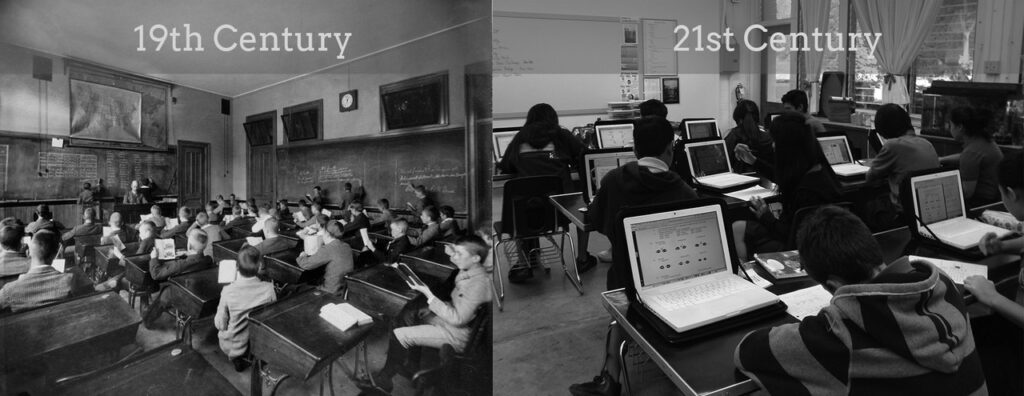
The education system at the beginning of the 21st century has changed compared to the 19th century. While students still learn in classrooms, they can now explore knowledge online, not just through teacher lectures. Therefore, Universal Design for Learning (UDL) provides students with multiple ways to access knowledge and engage with learning content. Providing flexible learning methods enables learners to thrive in cyberspace. This optimizes learning efficiency and supports students in different contexts.
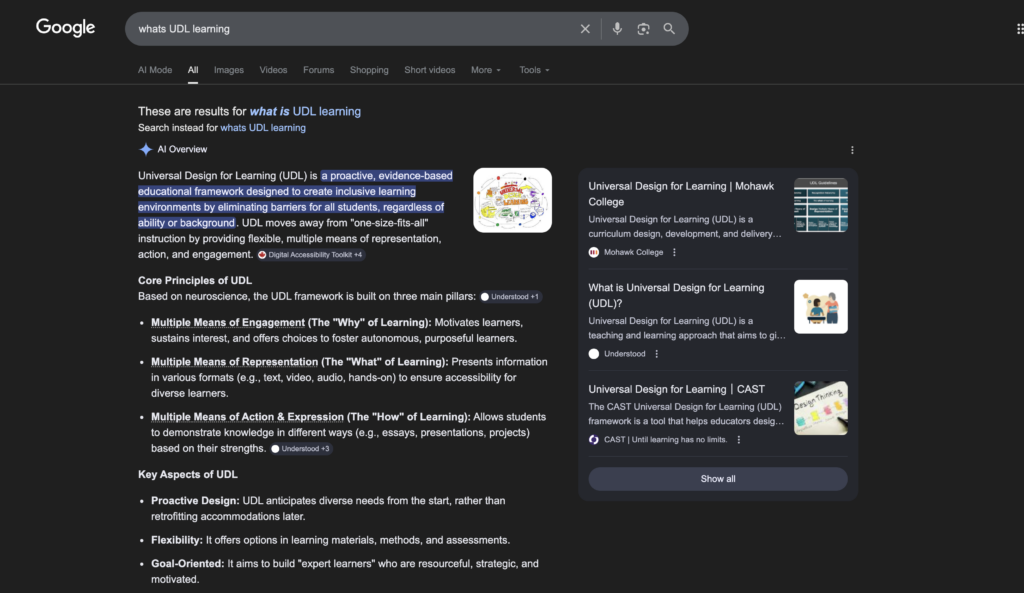
Google is one of the tools I often use when I am dealing with theory or concept questions. Google has a huge database, so students can search for any theoretical question or concept they are unsure about. This makes Google a great tool for self-learning.
For example, when I am confused about what UDL is, Google can provide the concept of UDL. As a result, this can help students learn more effectively and support self-learning. Students can look it up online and find the answer. This is much more effective than looking in a textbook and not knowing where to find the information. The only thing to be aware of is that some online information might be misleading or incorrect. Therefore, finding answers on a reliable website is an important factor that helps students learn.
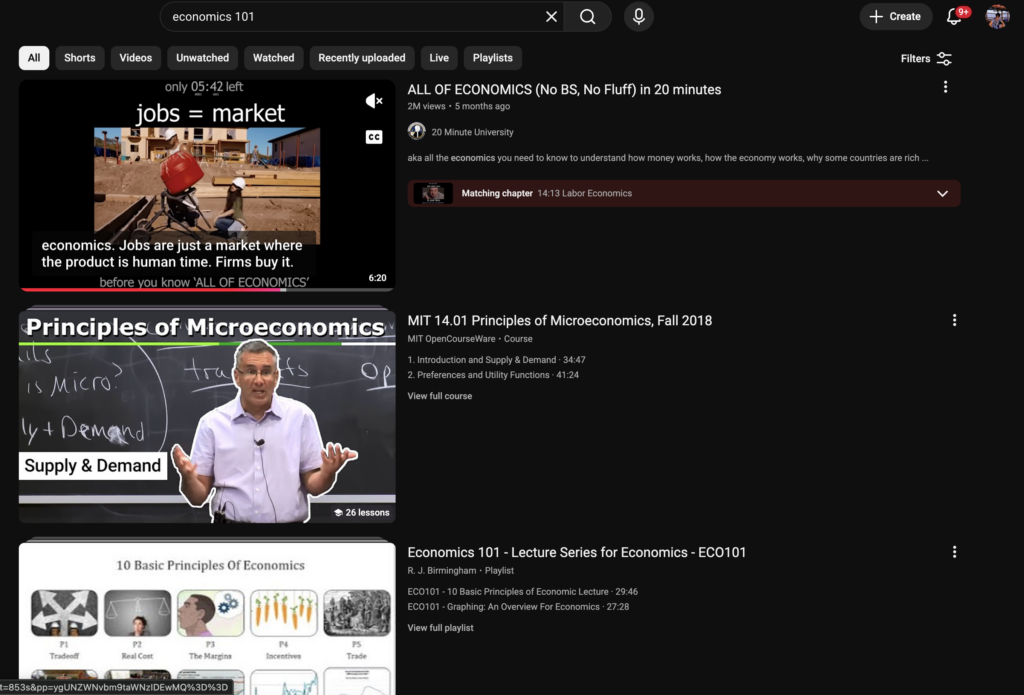
As an economics student at UVic, I use YouTube as a tool to help with learning. Sometimes, when I face a concept I don’t understand, I use YouTube. The biggest difference between YouTube and textbooks/notes is that, by watching YouTube, you can learn through video. The person in the video can walk you through the whole question step by step. This is a very useful tool when you are dealing with mathematical questions, because you can work on the question at the same time while watching the video. This can be very useful and effective for learning.
This means students can choose the best platform that works for them. Moreover, it also means that learning through different pathways has extended far beyond the four walls of the classroom. Each layer strengthens the others, turning a simple posting exercise into a richer cycle of learning experiences.
Students can build knowledge through their peers, instructors, or even by learning from others on different platforms. These platforms have played an important role in the learning process. Combining these factors can help students achieve a deeper and more effective learning experience. I believe students learning through these different platforms is a great example that combines social, teaching, and cognitive elements.