Accessibility and AI in Professional Technology Use
IIn this week’s topic, when it comes to accessibility and AI in professional technology use, it inspired me to think about how AI helps and supports people with different needs. Since AI can increase people’s work performance, I think it can be a great tool to help people with visual, hearing, cognitive, or physical disabilities have better accessibility in learning.
I would like to use an example to introduce this topic by sharing the content I created using AI. I think AI adds another layer to this discussion, thus I have used AI to create a website that includes accessibility features. https://edci136-1.lovable.app
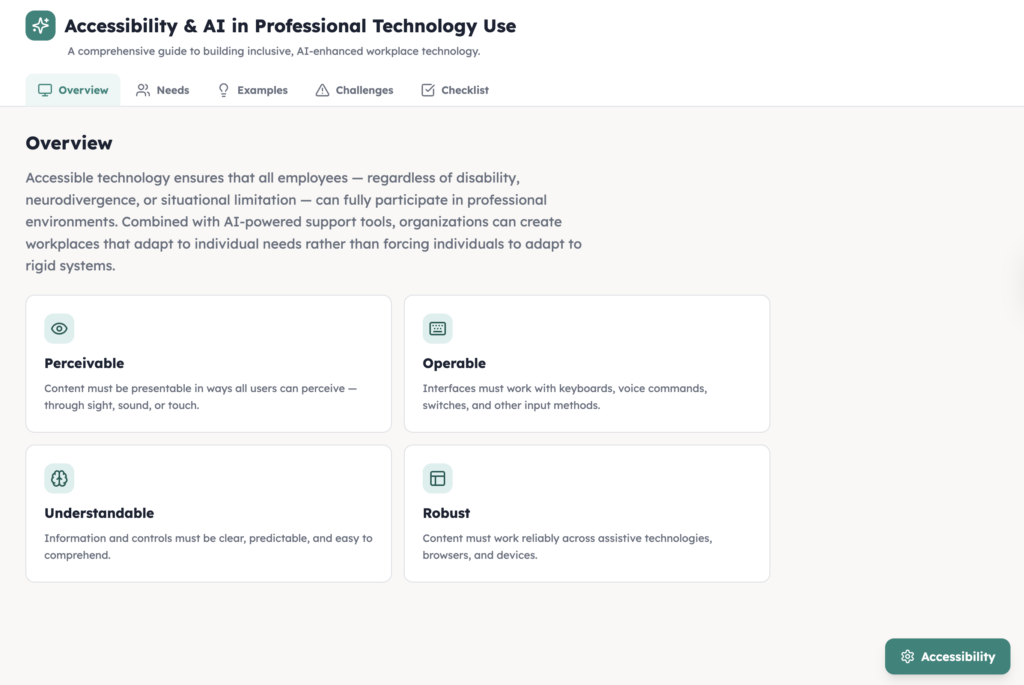
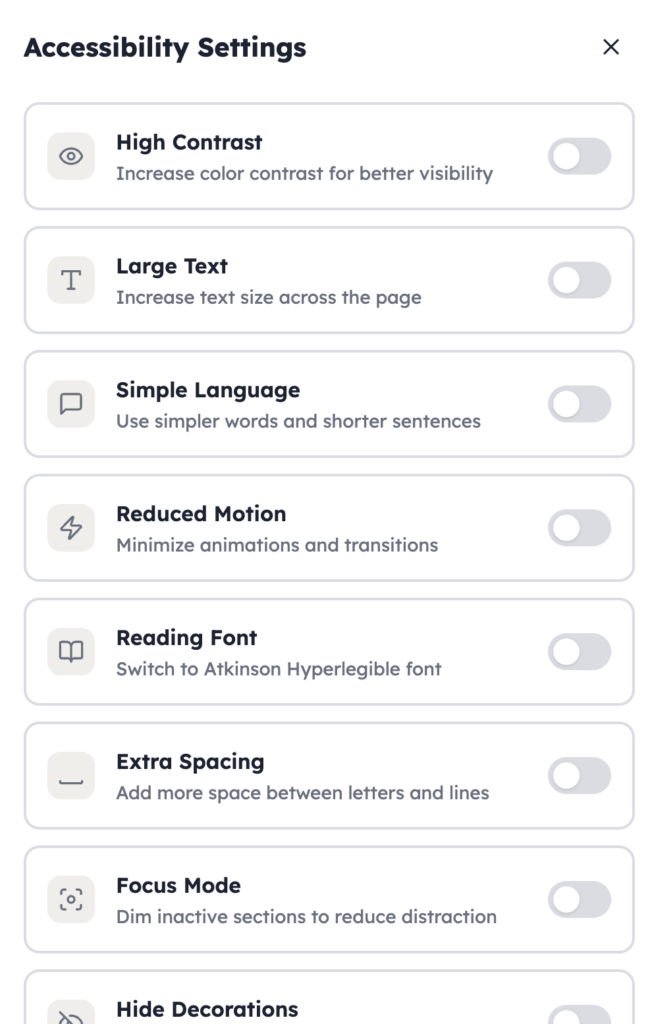
On the website, people may select the accessibility settings, and there are different sections that they can choose from. This will help take care of people with different needs. By adding different features for people to select when needed, this will support all kinds of people with different needs. AI is playing an important role in redesigning the webpage for people with different needs. This takes less than an hour; the creator only needs to know the basic code and the commands to give to AI, and then AI will redesign the webpage and publish it for everyone.
However, AI also has limitations and risks. Therefore, people should avoid overrelying on AI. It is important to know how to use different skills to help people with different needs. AI is just a tool that helps by providing more options and saving time when it comes to designing the learning process for learners.
In conclusion, accessibility and AI in professional technology use have a strong connection, and by using AI, it can help take care of people with different needs. The preparation work will not take too long, and it can maximize the benefits while reducing the costs of caring for all kinds of people.
HTML code:
import { useMemo, useState } from “react”;
import {
Accessibility,
Brain,
CheckCircle2,
Ear,
Eye,
Hand,
ListChecks,
MessageSquare,
Shield,
Type,
ZoomIn,
} from “lucide-react”;
const tabs = [“Overview”, “Needs”, “Examples”, “Challenges”, “Checklist”];
const disabilityGroups = [
{
title: “Visual Disabilities”,
icon: Eye,
needs: [
“Screen-reader friendly headings and navigation”,
“High contrast colors and readable fonts”,
“Alt text for images, diagrams, and icons”,
“Clear labels for buttons, forms, and links”,
],
example:
“A worker with low vision may rely on zoom, screen readers, and clear page structure to read workplace documents and online systems.”,
simple:
“People with visual disabilities may need larger text, stronger contrast, and screen-reader support.”,
},
{
title: “Hearing Disabilities”,
icon: Ear,
needs: [
“Captions and transcripts for audio and video”,
“Text alternatives for spoken content”,
“Visual alerts instead of sound-only alerts”,
“Clear written instructions and summaries”,
],
example:
“A Deaf employee may use captions and written summaries during virtual meetings so they can follow discussion clearly.”,
simple:
“People with hearing disabilities may need captions, transcripts, and visual alerts.”,
},
{
title: “Cognitive Disabilities”,
icon: Brain,
needs: [
“Plain language and shorter sections of text”,
“Consistent page layout and navigation”,
“Reduced information overload”,
“Step-by-step explanations and clear instructions”,
],
example:
“An employee with attention or processing challenges may benefit from simple wording, predictable layouts, and shorter tasks.”,
simple:
“People with cognitive disabilities may need simple language, clear structure, and less clutter.”,
},
{
title: “Physical Disabilities”,
icon: Hand,
needs: [
“Full keyboard navigation”,
“Large buttons and easy click targets”,
“Voice input and speech-to-text support”,
“Compatibility with assistive devices”,
],
example:
“A worker with limited hand mobility may use keyboard shortcuts or voice input instead of a mouse.”,
simple:
“People with physical disabilities may need keyboard access, voice tools, and bigger buttons.”,
},
];
const examples = [
{
title: “Accessible Meetings”,
detail:
“Meeting platforms should include captions, transcripts, readable chat, speaker labels, and keyboard-friendly controls.”,
simple:
“Online meetings should have captions, readable chat, and easy controls.”,
},
{
title: “Accessible Documents”,
detail:
“Professional documents should use headings, plain language, alt text, good contrast, and consistent formatting so more people can read them.”,
simple:
“Work documents should be clear, organized, and easy to read.”,
},
{
title: “Accessible Training”,
detail:
“Training materials should offer multiple formats such as text, captions, visuals, and step-by-step instructions.”,
simple:
“Training should come in more than one format.”,
},
{
title: “Accessible AI Tools”,
detail:
“AI tools should help with summaries, captioning, voice input, and readability, but their output should still be checked by people.”,
simple:
“AI can help, but people should still review the results.”,
},
];
const challenges = [
“AI captions or transcripts may be inaccurate”,
“Some websites look modern but do not work with screen readers”,
“Complex pages can overwhelm users with cognitive disabilities”,
“Small buttons and mouse-only design can block users with physical disabilities”,
“Bias in AI tools can affect fairness in hiring or workplace decisions”,
“Organizations may add AI without explaining how it works”,
];
const checklist = [
“Use strong contrast and readable font sizes”,
“Support screen readers and keyboard navigation”,
“Provide captions, transcripts, and text alternatives”,
“Write in plain language and break information into sections”,
“Keep buttons large and easy to select”,
“Reduce clutter and avoid unnecessary motion”,
“Check AI output for accuracy, bias, and accessibility”,
“Keep human review for important decisions”,
];
export default function AccessibilityAIProfessionalTechnologyUse() {
const [activeTab, setActiveTab] = useState(“Overview”);
const [highContrast, setHighContrast] = useState(false);
const [largeText, setLargeText] = useState(false);
const [simpleMode, setSimpleMode] = useState(false);
const [reducedMotion, setReducedMotion] = useState(false);
const [dyslexiaFont, setDyslexiaFont] = useState(false);
const [extraSpacing, setExtraSpacing] = useState(false);
const [focusMode, setFocusMode] = useState(false);
const [hideDecorations, setHideDecorations] = useState(false);
const [readingGuide, setReadingGuide] = useState(false);
const styles = useMemo(() => {
return {
page: highContrast ? “bg-black text-white” : “bg-slate-50 text-slate-900”,
hero: highContrast ? “bg-black text-white border-b border-white” : “bg-slate-900 text-white”,
card: highContrast
? “bg-black text-white border border-white”
: “bg-white text-slate-900 border border-slate-200 shadow-sm”,
soft: highContrast
? “bg-neutral-900 text-white border border-white”
: “bg-slate-100 text-slate-900 border border-slate-200”,
muted: highContrast ? “text-white/85” : “text-slate-600”,
buttonOn: highContrast ? “bg-white text-black” : “bg-slate-900 text-white”,
buttonOff: highContrast ? “bg-black text-white border border-white” : “bg-slate-100 text-slate-700”,
};
}, [highContrast]);
const textClass = ${largeText ? "text-[18px]" : "text-base"} ${extraSpacing ? "leading-10 tracking-[0.02em]" : "leading-8"};
const headingClass = largeText ? “text-3xl md:text-5xl” : “text-4xl md:text-6xl”;
const fontClass = dyslexiaFont ? “font-mono” : “font-sans”;
const motionClass = reducedMotion ? “transition-none” : “transition”;
return (
${styles.page} min-h-screen ${fontClass}}>
Skip to main content
  <header className={`${styles.hero} ${motionClass}`}>
    <div className={`mx-auto max-w-7xl px-6 py-16 md:px-10 lg:px-16 ${hideDecorations ? "" : "bg-[radial-gradient(circle_at_top_left,rgba(34,211,238,0.08),transparent_26%),radial-gradient(circle_at_bottom_right,rgba(168,85,247,0.08),transparent_24%)]"}`}>
      <div className="max-w-4xl">
        <div className="inline-flex items-center gap-2 rounded-full border border-white/20 px-4 py-2 text-sm">
          <Accessibility className="h-4 w-4" />
          Accessible Website: Accessibility and AI in Professional Technology Use
        </div>

        <h1 className={`mt-6 font-bold leading-tight ${headingClass}`}>
          Professional technology should work for people with visual, hearing, cognitive, and physical disabilities
        </h1>

        <p className={`mt-6 max-w-3xl ${largeText ? "text-xl leading-10" : extraSpacing ? "text-lg leading-10" : "text-lg leading-8"} text-white/85`}>
          This accessible website explains how workplaces can use technology and AI in ways that support more people. It focuses on clear design, fair systems, readable content, and better participation for users with different needs.
        </p>
      </div>
    </div>
  </header>

  <main id="main-content" className="mx-auto max-w-7xl px-6 py-8 md:px-10 lg:px-16">
    <section aria-labelledby="accessibility-controls" className={`rounded-3xl p-5 ${styles.card}`}>
      <h2 id="accessibility-controls" className="text-2xl font-semibold">
        Accessibility controls
      </h2>
      <p className={`mt-3 ${styles.muted} ${textClass}`}>
        These controls help different users adjust contrast, text size, reading style, spacing, and page focus based on their needs.
      </p>
      <div className="mt-5 grid gap-3 md:grid-cols-2 xl:grid-cols-3">
        <button
          type="button"
          aria-pressed={highContrast}
          onClick={() => setHighContrast((v) => !v)}
          className={`rounded-2xl px-5 py-4 text-left font-medium ${highContrast ? styles.buttonOn : styles.buttonOff}`}
        >
          <div>High Contrast</div>
          <div className="mt-1 text-sm opacity-80">Improves visibility with stronger color contrast</div>
        </button>

        <button
          type="button"
          aria-pressed={largeText}
          onClick={() => setLargeText((v) => !v)}
          className={`rounded-2xl px-5 py-4 text-left font-medium ${largeText ? styles.buttonOn : styles.buttonOff}`}
        >
          <div className="flex items-center gap-2"><ZoomIn className="h-4 w-4" /> Large Text</div>
          <div className="mt-1 text-sm opacity-80">Makes text easier to read</div>
        </button>

        <button
          type="button"
          aria-pressed={simpleMode}
          onClick={() => setSimpleMode((v) => !v)}
          className={`rounded-2xl px-5 py-4 text-left font-medium ${simpleMode ? styles.buttonOn : styles.buttonOff}`}
        >
          <div>Simple Language</div>
          <div className="mt-1 text-sm opacity-80">Uses shorter and easier wording</div>
        </button>

        <button
          type="button"
          aria-pressed={reducedMotion}
          onClick={() => setReducedMotion((v) => !v)}
          className={`rounded-2xl px-5 py-4 text-left font-medium ${reducedMotion ? styles.buttonOn : styles.buttonOff}`}
        >
          <div>Reduced Motion</div>
          <div className="mt-1 text-sm opacity-80">Removes extra visual movement</div>
        </button>

        <button
          type="button"
          aria-pressed={dyslexiaFont}
          onClick={() => setDyslexiaFont((v) => !v)}
          className={`rounded-2xl px-5 py-4 text-left font-medium ${dyslexiaFont ? styles.buttonOn : styles.buttonOff}`}
        >
          <div className="flex items-center gap-2"><Type className="h-4 w-4" /> Reading Font</div>
          <div className="mt-1 text-sm opacity-80">Switches to a more distinct letter style</div>
        </button>

        <button
          type="button"
          aria-pressed={extraSpacing}
          onClick={() => setExtraSpacing((v) => !v)}
          className={`rounded-2xl px-5 py-4 text-left font-medium ${extraSpacing ? styles.buttonOn : styles.buttonOff}`}
        >
          <div>Extra Spacing</div>
          <div className="mt-1 text-sm opacity-80">Adds more line and letter spacing</div>
        </button>

        <button
          type="button"
          aria-pressed={focusMode}
          onClick={() => setFocusMode((v) => !v)}
          className={`rounded-2xl px-5 py-4 text-left font-medium ${focusMode ? styles.buttonOn : styles.buttonOff}`}
        >
          <div>Focus Mode</div>
          <div className="mt-1 text-sm opacity-80">Reduces visual distraction and highlights content</div>
        </button>

        <button
          type="button"
          aria-pressed={hideDecorations}
          onClick={() => setHideDecorations((v) => !v)}
          className={`rounded-2xl px-5 py-4 text-left font-medium ${hideDecorations ? styles.buttonOn : styles.buttonOff}`}
        >
          <div>Hide Decorations</div>
          <div className="mt-1 text-sm opacity-80">Removes extra visual styling and background effects</div>
        </button>

        <button
          type="button"
          aria-pressed={readingGuide}
          onClick={() => setReadingGuide((v) => !v)}
          className={`rounded-2xl px-5 py-4 text-left font-medium ${readingGuide ? styles.buttonOn : styles.buttonOff}`}
        >
          <div>Reading Guide</div>
          <div className="mt-1 text-sm opacity-80">Adds a reading helper line for long text sections</div>
        </button>
      </div>
    </section>

    {readingGuide && (
      <div className={`mt-6 rounded-2xl px-5 py-3 ${styles.soft}`}>
        <p className={`${textClass}`}>
          Reading guide active: move through one section at a time and use the tabs below to focus on a single topic.
        </p>
      </div>
    )}

    <section aria-labelledby="summary-cards" className="mt-8">
      <h2 id="summary-cards" className="sr-only">
        Summary cards
      </h2>
      <div className={`grid gap-6 md:grid-cols-2 xl:grid-cols-4 ${focusMode ? "max-w-5xl mx-auto" : ""}`}>
        {disabilityGroups.map((group) => {
          const Icon = group.icon;
          return (
            <article key={group.title} className={`rounded-3xl p-6 ${styles.card} ${motionClass}`}>
              <Icon className="h-7 w-7" aria-hidden="true" />
              <h3 className="mt-4 text-2xl font-semibold">{group.title}</h3>
              <p className={`mt-4 ${styles.muted} ${textClass}`}>
                {simpleMode ? group.simple : group.example}
              </p>
            </article>
          );
        })}
      </div>
    </section>

    <section aria-labelledby="content-sections" className={`mt-8 rounded-3xl p-5 ${focusMode ? `${styles.card} max-w-5xl mx-auto` : styles.card}`}>
      <h2 id="content-sections" className="text-2xl font-semibold">
        Topic sections
      </h2>
      <div
        role="tablist"
        aria-label="Accessibility and AI topic sections"
        className="mt-5 flex flex-wrap gap-3"
      >
        {tabs.map((tab) => (
          <button
            key={tab}
            role="tab"
            aria-selected={activeTab === tab}
            aria-controls={`panel-${tab}`}
            id={`tab-${tab}`}
            onClick={() => setActiveTab(tab)}
            className={`rounded-2xl px-4 py-3 text-sm font-medium ${
              activeTab === tab ? styles.buttonOn : styles.buttonOff
            }`}
          >
            {tab}
          </button>
        ))}
      </div>

      {activeTab === "Overview" && (
        <section
          role="tabpanel"
          id="panel-Overview"
          aria-labelledby="tab-Overview"
          className="mt-6 grid gap-6 lg:grid-cols-[1.1fr_0.9fr]"
        >
          <div>
            <h3 className="text-3xl font-semibold">Why accessible professional technology matters</h3>
            <p className={`mt-4 ${styles.muted} ${textClass}`}>
              {simpleMode
                ? "Workplace technology should be easy to use for different people. AI can help with captions, summaries, voice tools, and simpler information. But technology must still be designed carefully so it does not create barriers."
                : "Workplace technology affects communication, training, scheduling, hiring, documents, and daily tasks. Because these tools shape participation, they should be accessible to people with different disabilities. AI can support accessibility through captions, summaries, voice tools, and readability improvements, but it should not replace good design or human review."}
            </p>
            <div className="mt-6 grid gap-4 md:grid-cols-3">
              <div className={`rounded-3xl p-5 ${styles.soft}`}>
                <Accessibility className="h-6 w-6" />
                <h4 className="mt-3 text-xl font-semibold">Accessible design</h4>
                <p className={`mt-2 ${textClass}`}>Technology should be usable from the start.</p>
              </div>
              <div className={`rounded-3xl p-5 ${styles.soft}`}>
                <MessageSquare className="h-6 w-6" />
                <h4 className="mt-3 text-xl font-semibold">Clear communication</h4>
                <p className={`mt-2 ${textClass}`}>People need information in more than one format.</p>
              </div>
              <div className={`rounded-3xl p-5 ${styles.soft}`}>
                <Shield className="h-6 w-6" />
                <h4 className="mt-3 text-xl font-semibold">Fair use of AI</h4>
                <p className={`mt-2 ${textClass}`}>Important decisions still need human oversight.</p>
              </div>
            </div>
          </div>

          <aside className={`rounded-3xl p-6 ${highContrast ? "bg-neutral-900 border border-white" : "bg-slate-900 text-white"}`}>
            <h3 className="text-2xl font-semibold">Accessibility options now included</h3>
            <div className={`mt-4 space-y-3 ${largeText ? "text-lg" : "text-base"} ${extraSpacing ? "leading-10" : "leading-8"}`}>
              <p>• High contrast mode</p>
              <p>• Large text mode</p>
              <p>• Simple language mode</p>
              <p>• Reduced motion mode</p>
              <p>• Reading font option</p>
              <p>• Extra spacing option</p>
              <p>• Focus mode</p>
              <p>• Hide decorations option</p>
              <p>• Reading guide support</p>
            </div>
          </aside>
        </section>
      )}

      {activeTab === "Needs" && (
        <section
          role="tabpanel"
          id="panel-Needs"
          aria-labelledby="tab-Needs"
          className="mt-6 grid gap-5 xl:grid-cols-2"
        >
          {disabilityGroups.map((group) => {
            const Icon = group.icon;
            return (
              <article key={group.title} className={`rounded-3xl p-6 ${styles.soft}`}>
                <div className="flex items-center gap-3">
                  <Icon className="h-6 w-6" aria-hidden="true" />
                  <h3 className="text-2xl font-semibold">{group.title}</h3>
                </div>
                <p className={`mt-4 ${textClass}`}>
                  {simpleMode ? group.simple : group.example}
                </p>
                <ul className="mt-5 space-y-3">
                  {group.needs.map((need) => (
                    <li key={need} className={`rounded-2xl p-4 ${styles.card}`}>
                      {need}
                    </li>
                  ))}
                </ul>
              </article>
            );
          })}
        </section>
      )}

      {activeTab === "Examples" && (
        <section
          role="tabpanel"
          id="panel-Examples"
          aria-labelledby="tab-Examples"
          className="mt-6"
        >
          <h3 className="text-3xl font-semibold">Examples of accessible workplace technology</h3>
          <div className="mt-6 grid gap-5 md:grid-cols-2 xl:grid-cols-4">
            {examples.map((item) => (
              <article key={item.title} className={`rounded-3xl p-5 ${styles.soft}`}>
                <h4 className="text-xl font-semibold">{item.title}</h4>
                <p className={`mt-3 ${textClass}`}>{simpleMode ? item.simple : item.detail}</p>
              </article>
            ))}
          </div>
        </section>
      )}

      {activeTab === "Challenges" && (
        <section
          role="tabpanel"
          id="panel-Challenges"
          aria-labelledby="tab-Challenges"
          className="mt-6 grid gap-6 lg:grid-cols-[0.95fr_1.05fr]"
        >
          <div className={`rounded-3xl p-6 ${highContrast ? "bg-neutral-900 border border-white" : "bg-rose-50 border border-rose-100"}`}>
            <h3 className="text-3xl font-semibold">Common challenges</h3>
            <ul className="mt-5 space-y-3">
              {challenges.map((item) => (
                <li key={item} className={`rounded-2xl p-4 ${styles.card}`}>
                  {item}
                </li>
              ))}
            </ul>
          </div>
          <div className={`rounded-3xl p-6 ${styles.soft}`}>
            <h3 className="text-3xl font-semibold">Why these challenges matter</h3>
            <p className={`mt-4 ${textClass}`}>
              {simpleMode
                ? "If technology is not accessible, some people may be left out of work, training, or communication. AI can help, but it can also make mistakes. That is why workplaces should test technology with different users and review important results carefully."
                : "If workplace technology is inaccessible, people may face barriers in communication, training, performance, and opportunity. AI can improve access, but it can also introduce errors, bias, and confusion. Organizations should test systems with diverse users, review AI results carefully, and make accessibility part of everyday professional practice."}
            </p>
          </div>
        </section>
      )}

      {activeTab === "Checklist" && (
        <section
          role="tabpanel"
          id="panel-Checklist"
          aria-labelledby="tab-Checklist"
          className="mt-6 grid gap-6 lg:grid-cols-[1fr_1fr]"
        >
          <div>
            <h3 className="text-3xl font-semibold">Accessible website checklist</h3>
            <div className="mt-5 space-y-4">
              {checklist.map((item) => (
                <div key={item} className={`flex items-start gap-3 rounded-2xl p-4 ${styles.card}`}>
                  <CheckCircle2 className="mt-1 h-5 w-5" aria-hidden="true" />
                  <p className={textClass}>{item}</p>
                </div>
              ))}
            </div>
          </div>
          <div className={`rounded-3xl p-6 ${highContrast ? "bg-neutral-900 border border-white" : "bg-gradient-to-br from-cyan-50 to-violet-50 border border-slate-200"}`}>
            <div className="flex items-center gap-3">
              <ListChecks className="h-6 w-6" aria-hidden="true" />
              <h3 className="text-3xl font-semibold">Final message</h3>
            </div>
            <p className={`mt-4 ${textClass}`}>
              {simpleMode
                ? "A good website should be easy to read, easy to move through, and easy to understand. Professional technology should support people with different disabilities, and AI should be used in ways that improve access instead of creating new barriers."
                : "A user-friendly accessible website should be readable, navigable, understandable, and flexible for different users. Professional technology should support people with visual, hearing, cognitive, and physical disabilities, and AI should be used to improve access rather than create new barriers."}
            </p>
          </div>
        </section>
      )}
    </section>
  </main>
</div>
);
}
Leave a Reply